- Build automation is essentially automating how the software is built instead of manually invoking the compiler. This would be accomplished via tools such as Makefiles or Ant.
- Deployment automation is less well-define but involves taking your built software and “deploying” or “installing” it on a test or production system.
- Continuous integration means having an automated process build your software continuously as developers check in code. For example, every 15 to 30 minutes a server might wake up, look for new check-ins, and build the project if any changes were made.
- Continuous delivery is a combination of CI and DA where the software builds from CI are also deployed to a test system.
Author: Manjunath
“Life is about passions. Thank you for sharing mine” -- M. Schumacher
Basic use cases in XSLT
| Use case | Relevant XSLT elements |
|---|---|
| Creating nodes | xsl:element, xsl:attribute, xsl:text, xsl:comment, xsl:processing-instruction |
| Copying nodes | xsl:copy-of, xsl:copy |
| Repetition (looping) | xsl:for-each |
| Sorting | xsl:sort |
| Conditional processing | xsl:choose, xsl:if |
| Computing or extracting a value | xsl:value-of |
| Defining variables and parameters | xsl:variable, xsl:param |
| Defining and calling subprocedures (named templates) | xsl:template, xsl:call-template |
| Defining and applying template rules | xsl:template, xsl:apply-templates, xsl:apply-imports |
| Numbering and number formatting | xsl:number, xsl:decimal-format |
| Debugging | xsl:message |
| Combining stylesheets (modularization) | xsl:import, xsl:include |
| Compatibility | xsl:fallback |
| Building lookup indexes | xsl:key |
| XSLT code generation | xsl:namespace-alias |
| Output formatting | xsl:output |
| Whitespace stripping | xsl:strip-space, xsl:preserve-space |
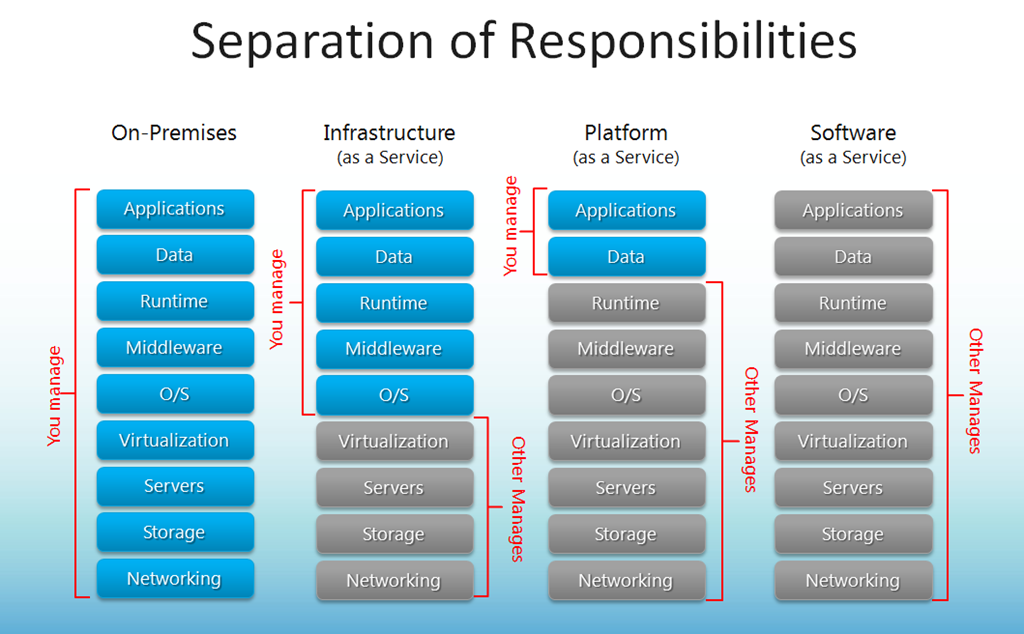
Cloud Stack
Pipeline Component Load() and Save() error
Error:
Pipeline Component gives error “Pipeline componet Load() method failed on IPersistPropertyBag implementation: <name of the Pipeline component>” while dragged on one of the stages for pipeline

Pipeline Component gives error “Pipeline componet Save() method failed on IPersistPropertyBag implementation: <name of the Pipeline component>” while trying to save the pipeline

Solution: Implement the Argument exception handling. Do not use third party dll in the argument exception handling
Microsoft.BizTalk.Component.Interop.IPropertyBag pb;
string propName;
string propName;
object val = null;
try
{
pb.Read(propName, out val, 0);
}
catch (System.ArgumentException argEx)
{
//Do not use third pary dll logging
return val;
}
catch (System.Exception e)
{
//Can use any third party dll logging
throw new System.ApplicationException(e.Message);
}
return val;
Pipeline Component, Seekable stream issue
One of my projects we were working on the the Archiving pipeline component. we want to file in any stage of the pipeline component, hence we had it as any type
[ComponentCategory(CategoryTypes.CATID_Any)]
[ComponentCategory(CategoryTypes.CATID_PipelineComponent)]
Error faced:
There was a failure executing the send pipeline: “<Pipeline assembly>” Source: “<Pipeline Component name>” Send Port: “<Send port name>” URI: “URI path” Reason: ForwardOnlyEventingReadStream does not support Seek()
Cause:
usage of stream (System.IO.Stream) object when it is non seekable. when the stream object becomes non seekable the data in the stream get lost. when tried to retreive data from the stream the above error appears.
Solution:
Use seekable object from the class Microsoft.BizTalk.Streaming.ReadOnlySeekableStream. This ReadOnlySeekableStream is overrided implemenation (Inherited class) ofthe stream and handles seekable stream.
//Donot use stream objects
originalStrm = new ReadOnlySeekableStream(inmsg.BodyPart.GetOriginalDataStream());
//After Catch use this
finally
{
if (binWriter != null)
{
binWriter.Flush();
binWriter.Close();
}
if (originalStrm != null)
{
if (!originalStrm.CanSeek)
{
ReadOnlySeekableStream seekableStream = new ReadOnlySeekableStream(inmsg.BodyPart.GetOriginalDataStream());
seekableStream.Position = 0;
inmsg.BodyPart.Data = seekableStream;
inmsg.BodyPart.Data.Position = 0;
}
else
{
originalStrm.Seek(0, SeekOrigin.Begin);
inmsg.BodyPart.Data = originalStrm;
}
}
}
Implementation of macro in Pipeline Component
Below are few of the macros and implementation in .Net/BizTalk.net. This can be directly used in the archiving pipeline component
“%datetime%” -> DateTime.Now.ToString(“yyyy-MM-ddTHHmmss”);
“%datetime_bts2000%” -> DateTime.Now.ToString(“yyyyMMddHHmmsss”);
“%datetime.tz%” -> DateTime.Now.ToString(“yyyy-MM-ddTHHmmsszzz”).Replace(“:”,“”);
“%MessageID%” -> InMsg.MessageID.ToString();
“%SourceFileName%” -> InMsg.Context.Read(“ReceivedFileName”, “http://schemas.microsoft.com/BizTalk/2003/file-properties”).ToString();
“%time%” -> DateTime.Now.ToString(“HHmmss”).Replace(“:”, “”);
“%time.tz%” -> DateTime.Now.ToString(“HHmmsszzz”).Replace(“:”, “”);
Implementaion of the searching pattern to search the pattern %<any alpha number or . >%
string pattern = @”[%][\w|.]*[%]”;
string strMatch = “”;
foreach (Match match in Regex.Matches(FileNameWithMacro, pattern))
{
ReadMacro(match.Value); //This will be method implmentation of replacing macro with actaull file content.
FileName = FileName.Replace(match.Value, strMatch);
strMatch =“”;
}
FTP Send port: Representation mode
we ran into carriage return and line feed issue during file transfer. The transfer was between different operating platform. The file was written on to FTP path from windows operating system and it read from Linux HP UX machine.
Issue: Additional CR (carriage return) character was added at the end every line
Cause: The mode of transfer was set to binary, actual mode that had to be used was ASCII mode.
This is due to the fact that new line character is handled differently in Windows and UNIX OS. On a Windows computer, pressing the “enter” key inserts two characters in an ASCII text document – a carriage return and a line feed. On UNIX systems, only a line feed is used. ASCII text formatted for use on UNIX systems does not display properly when viewed on a Windows system and vice verse.
So, what is the difference between ASCII and binary?
An ASCII file is a file represented internally using ASCII Codes. ASCII code is a 7-bit code stored in a byte. So in total there are 2^7 = 128 different ASCII codes. for every byte, one bit is wasted.
In binary 8 bits, that is 2^8 = 256 representations are possible.
Its not representation but OS defines what newline is:
DOS / Windows CR LF 0x0D 0x0A
Mac CR 0x0D
Unix LF 0x0A
Solution:
Use ASCII mode when different operating systems are involved else use binary mode to transfer binary files. Reading newline character as LF in UNIX and CRLF in windows is taken care automatically by OS. One shouldn’t worry about it.
-Manju
BizTalk error: Exception occurred when persisting state to the database
Error: Inner exception: Exception occurred when persisting state to the database.
Exception type: PersistenceException
Source: Microsoft.XLANGs.BizTalk.Engine
Target Site: Void Commit()
The following is a stack trace that identifies the location where the exception occured
at Microsoft.BizTalk.XLANGs.BTXEngine.BTXXlangStore.Commit()
at Microsoft.XLANGs.Core.Service.Persist(Boolean dehydrate, Context ctx, Boolean idleRequired, Boolean finalPersist, Boole
Cause: One of the cause is when we have direct send port in orchestrations, and no subscriptions are listening to it. The message will be sent to message box and message will be suspended routing error. The issue comes when orchestration engine try to save the persistence point just after the send shape. As the subscriptions, are not available its throw an exception as “Exception occurred when persisting state to the database”
Solution: Have subscription for all message especially when we have direct port.

BizTalk 2013: SSO Application Configuration Storage Tool
Beep Beep Boop!!
Finally, Here it is! The ultimate solution for all the issues and questions faced for storing the configuration in SSO store. Before introducing the windows application, what is SSO storage tool? why is it required? Storing configuration data in the SSO database with ease of access in all application. Key Value pairs can be access by any application which are part SSO affiliation or SSO administrators group. The key value pairs can be accessed by the BizTalk Server process without need to refresh the server process.
“THIS IS THE TOOL HAVING FEATURES OF BOTH ‘SSO APPLICATION CONFIGURATION BIZTALK 2013‘ AND ‘SSO WINDOWS APPLICATION‘”
Why do we need to encrypt SSO config files? The SSO configuration has got popular since the tool was conceptualize by Richard Seroter since 2007. It is when I started learning BizTalk Server 2006 r2. The tool is used to very sensitive data such as connection strings, passwords. With many customers where deployment process is strictly followed and the protection of sensitive information become important. Encryption of the configuration plays a key role. MD5 with TripleDES symmetric encryption is used with Electronic CodeBook mode. The encrypted data is the base64 encoded format.
Custom Tool: I started adding up more and more features as and when as required and was using it for self use. The thoughts and the features started to add in the tool and have come up for handy features. Being a developer, wanted to put all possible effort to make tools which can to make our life simpler. This is tool is based on the Microsoft.BizTalk.Interop.SSOClient.dll, Microsoft.EnterpriseSingleSignOn.Interop.dll version 9.0.1000.0. The tool is developed in dotnet 4.0 and is not testing if it supports prior versions.
Old Features: – Displays application list9.0.1000.0 – One click modification of key/value pairs – One click of multiple application export. – Doesn’t display junk applications starting with ‘{‘
Release version 2.0.0.0 Summary: – User accounts can be auto populated – User accounts can now be edited – fixed user accounts snapping issue for multiple export – Lasted version support Microsoft.EnterpriseSingleSignOn.Interop 9.0.1000.0 – Microsoft MMC SSO config storage compatibility support – MD5 symmetric encrypt/decrypt support
File Formats Used: *.sso – encrypted MMC console *.xml – xml legacy format *.ssox – encrypted legacy format *.encrypt – encrypted file *.decrypt – decrypted file note: The format *.sso and *.ssox are different as the plain text xml formats are different. *.sso files needs to be used only with the compatibility mode as “mmc console” and *.ssox needs to be used with the mode “Windows App”. The tool also provides encryption and decryption of the sample files to troubleshoot/understand the file format issues. In case of MMC console mode (for case of *.sso), application name is considered from the file name wheres the application name is part of xml. The sample xml file format is as below:  Storage Tool:

The tool can be download at here Any suggestions are welcome! Write To: manjunathp@ymail.com
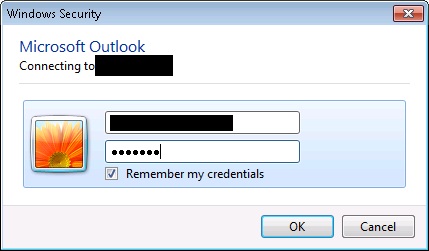
Outlook Credentials keeps popping up
Issue: when u configure the outlook email box, the credentials window keeps popping up again and again even after the correct credentials is entered
Resolution:
1) Clear vault in the credentials manager ( ***IMPORTANT*** make sure you take a backup and screenshot of the server details in credentials manager)
2) Repair install the office to this resolves the issue some times. Also try installing service pack
3) This resolution step worked for me. Create new profile in the email, and re-configure the mail box. If this doesn’t resolves the issue, then add the windows credentials manually for your email exchange server. You can get exchanger server info that needs to be added in credential manager either by capturing network packets using tools such as Wire-Shark or fiddler (OR you can also get server details from the backup screen shot from step 1 if you are configuring outlook for 2nd time)

4) You also uncheck the proxy, if it is checked. This causes the error message as
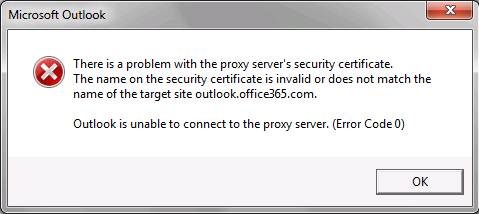

There is not specific solutions for this issue which worked for me right away. I had to struggle for some 2 days to get it worked. Any of the above solutions can work for you. Please comment if you have any specific/above solution worked for you.
Good Day!
-Manju


You must be logged in to post a comment.