BizTalk

Context “WCF.Headers” is cached in BizTalk Engine

The scenario where we encountered this issue was during Salesforce integration. Salesforce expects custom header to be passed in the soap envolope.

Issue: INVALID_SESSION_ID: Invalid Session ID found in SessionHeader: Illegal Session. Session not found, missing session hash: wbecQmJucxUexYVBpM7E2jqTFaqEPZRWpOdXMu2wJC8= This error usually occurs after a session expires or a user logs out.


Current :-


msgQueryAllReq(WCF.Headers) = “<headers><SessionHeader xmlns=’urn:partner.soap.sforce.com’><sessionId>” + SessionId +  “</sessionId></SessionHeader></headers>”;

New/Solution:-

msgQueryAllReq(WCF.OutboundCustomHeaders) = “<headers><SessionHeader xmlns=’urn:partner.soap.sforce.com’><sessionId>” + SessionId +  “</sessionId></SessionHeader></headers>”;

Keep Takeaways:

  1. WCF.Headers is cached by BizTalk engine.
  2. SessionHeader should have namespace urn:partner.soap.sforce.com
  3. Session Inactivity time under profile/user level overrides organisation level timeout settings.
  4. Session Management setting in Salesforce gives created and valid until time for every session.
  5. Session ID in login response, session ID in session management and session hash code are linked 1-1.
  6. Session hash code is unique for any given session ID in Salesforce


References:

https://docs.microsoft.com/en-us/biztalk/core/using-soap-headers-in-wcf-messages-with-orchestrations

https://social.msdn.microsoft.com/Forums/en-US/aa8958fe-6b64-427d-9c40-89e516304d5b/biztalk-cached-value-not-getting-changed?forum=biztalkgeneral


Azure

What does SLA mean in cloud – Azure

https://en.wikipedia.org/wiki/High_availability

https://azure.microsoft.com/en-in/support/legal/sla/summary/

https://azure.microsoft.com/en-us/support/legal/sla/cloud-services/v1_5/

Availability % Downtime per year Downtime per month Downtime per week Downtime per day
55.5555555% (“nine fives”) 162.33 days 13.53 days 74.92 hours 10.67 hours
90% (“one nine”) 36.53 days 73.05 hours 16.80 hours 2.40 hours
95% (“one and a half nines”) 18.26 days 36.53 hours 8.40 hours 1.20 hours
97% 10.96 days 21.92 hours 5.04 hours 43.20 minutes
98% 7.31 days 14.61 hours 3.36 hours 28.80 minutes
99% (“two nines”) 3.65 days 7.31 hours 1.68 hours 14.40 minutes
99.5% (“two and a half nines”) 1.83 days 3.65 hours 50.40 minutes 7.20 minutes
99.8% 17.53 hours 87.66 minutes 20.16 minutes 2.88 minutes
99.9% (“three nines”) 8.77 hours 43.83 minutes 10.08 minutes 1.44 minutes
99.95% (“three and a half nines”) 4.38 hours 21.92 minutes 5.04 minutes 43.20 seconds
99.99% (“four nines”) 52.60 minutes 4.38 minutes 1.01 minutes 8.64 seconds
99.995% (“four and a half nines”) 26.30 minutes 2.19 minutes 30.24 seconds 4.32 seconds
99.999% (“five nines”) 5.26 minutes 26.30 seconds 6.05 seconds 864.00 milliseconds
99.9999% (“six nines”) 31.56 seconds 2.63 seconds 604.80 milliseconds 86.40 milliseconds
99.99999% (“seven nines”) 3.16 seconds 262.98 milliseconds 60.48 milliseconds 8.64 milliseconds
99.999999% (“eight nines”) 315.58 milliseconds 26.30 milliseconds 6.05 milliseconds 864.00 microseconds
99.9999999% (“nine nines”) 31.56 milliseconds 2.63 milliseconds 604.80 microseconds 86.40 microseconds
Azure, Azure Integration Services

MalformedToken: Invalid authorization header: The request is missing WRAP authorization credentials.

I was stuck error “MalformedToken: Invalid authorization header: The request is missing WRAP authorization credentials.” while configuring WCF relay in the API management application and BizTalk.

Flow is APIM -> Azure Relay -> BizTalk receive location.

Issue was coming when the APIM was trying to communicate to Azure Relay. I wasn’t sure what was the problem initially but some thing was wrong with Authorization header.

Later on i realized, by reading many msdn articles on how SAS token works. SAS Token is not SAS authorization key we see in Azure portal. SAS token needs to be generated via code as in the article https://docs.microsoft.com/en-us/rest/api/eventhub/generate-sas-token. I picked up PowerShell do it.

Also when i started using this, realized this SAS token generated is valid only for 300 secs. If you want to generate SAS token for infinite then could use 500 years as expiry time.

[Reflection.Assembly]::LoadWithPartialName(“System.Web”)| out-null
$URI=”<relay name>.servicebus.windows.net”
$Access_Policy_Name=”RootManageSharedAccessKey”
$Access_Policy_Key=”<shared access key>”
#Token expires now+300
$Expires=([DateTimeOffset]::Now.AddYears(500).ToUnixTimeSeconds())+300
$SignatureString=[System.Web.HttpUtility]::UrlEncode($URI)+ “`n” + [string]$Expires
$HMAC = New-Object System.Security.Cryptography.HMACSHA256
$HMAC.key = [Text.Encoding]::ASCII.GetBytes($Access_Policy_Key)
$Signature = $HMAC.ComputeHash([Text.Encoding]::ASCII.GetBytes($SignatureString))
$Signature = [Convert]::ToBase64String($Signature)
$SASToken = “SharedAccessSignature sr=” + [System.Web.HttpUtility]::UrlEncode($URI) + “&sig=” + [System.Web.HttpUtility]::UrlEncode($Signature) + “&se=” + $Expires + “&skn=” + $Access_Policy_Name
$SASToken

This article is valid for service bus queue, tables, storage and many azure resources using SAS token based authorization.

Azure

Azure PowerShell Cheat Sheet

# Enable access from Remote
Set-ExecutionPolicy RemoteSigned

# Installs latest modules side by side
Install-Module -Name AzureRM -AllowClobber -Force

# Import the module into the PowerShell session
Import-Module AzureRM
# Connect to Azure with an interactive dialog for sign-in
Connect-AzureRmAccount

# Get all version of the modules installed
Get-Module -Name AzureRM -List | select Name,Version

# To make sure the Azure PowerShell module is available after you install
Get-Module -ListAvailable Azure*

Note: This CheatSheet will undergo updates.


Azure

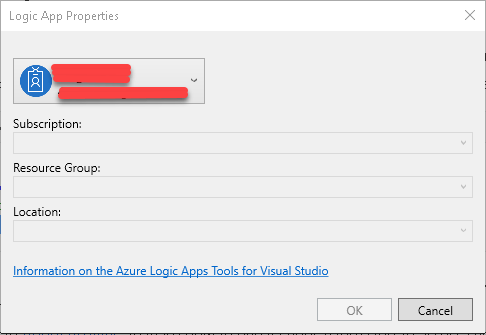
Visual Studio 2017 does not Show Azure-subscription

Issue:

Visual Studio 2017 does not Show up Azure-subscription whereas in PowerShell console its works.

2018-10-15_20-56-33

Solution option 1:

  1. Close all visual studio instances
  2. Delete %LOCALAPPDATA%.IdentityService file
  3. Restart Visual Studio and log in to server explorer and it might resolve the issue.

Solution option 2:

In Visual Studio 2017, first you need to install Cloud Explorer for Visual Studio 2017 (Tools –> Extensions and Updates). To complete this install, you are going to have to close your project and exit Visual Studio and then it will install.
After you re-open Visual Studio, double check to make sure you installed the Cloud Explorer.

Now open the Cloud Explorer (View –> Cloud Explorer)
You should see a listing item that says “Azure” with your login identifier but it may say
Right click on the item that says Azure and then select “Connect to Microsoft Azure Subscription”
You will need to sign in once again to your Microsoft Account even though you are already signed into Visual Studio 2017
Then it says “One or More Services are not supported by Server Explorer, open in Cloud Explorer”.

2018-10-15_21-42-16

Oyla! it worked.

2018-10-15_22-13-04

.Net, C#, Technology and tricks

System.Runtime.InteropServices.COMException – Task scheduler – Console application

Description: The process was terminated due to an unhandled exception.
Exception Info: System.Runtime.InteropServices.COMException
Stack:
at Microsoft.Office.Interop.Excel.Workbooks.Open(System.String, System.Object, System.Object, System.Object, System.Object, System.Object, System.Object, System.Object, System.Object, System.Object, System.Object, System.Object, System.Object, System.Object, System.Object)
at NotificationReportGenerator.ExcelFactory.ReadExcel(System.String)
at NotificationReportGenerator.Program.Main(System.String[])

The solution for this appalling BUG in Microsoft IIS & Excel is terrific:

  1. Create directory “C:\Windows\SysWOW64\config\systemprofile\Desktop ” (for 64 bit Windows) or “C:\Windows\System32\config\systemprofile\Desktop ” (for 32 bit Windows)
  2. Set Full control permissions for directory Desktop (for example in Win7 & IIS 7 & DefaultAppPool set permissions for user
    “IIS AppPool\DefaultAppPool”)
.Net, C#, Visual Studio

Issue with Visual Studio sign using Azure account

If you are ending with errors while logging in to Visual Studio (2015 or 2017) with your Microsoft subscription account with error message “Cookies are blocked, cannot login”. Then below is setting change you need to do in “Internet Options” to resolve it.

Visual studio always used internet engine for internet connectivity and I didn’t find any way to change it to use to Mozilla or any other internet engine.

Below  change in “Internet Options” setting prompts to accept cookies and this resolved the issue.

Untitled.png

After changing, try to login, you we will prompted to accept cookie couple of times. This will resolve the issue


Azure

Tips on Becoming MCSA – Cloud Platform

This is my first blog on Azure. I would like to share my experience on the Microsoft exam azure. Before starting will would give background of my achievement. “I’ve cleared 70-532 and 70-534 in single day”. Yes, you heard it right! Trust me this isn’t that difficult

Exam Pattern in Pearson (In general):

There will two parts to exam
1) Survey section :

I felt this survey is not important. This will contain set of survey questions about your proficiency level in each section of that particular exam.

Initially, I felt it some junk thing and marked my self as proficient (highest second) in survey for 70-532 exam. After survey, the question which appeared  in exam looked little difficult to answer.

For the second exam, I realized this and marked my proficiency level as least second for exam 70-534. The questions which appear in exam weren’t that difficult.

I’m not sure if survey really matters in determining exam question difficultly level, but this is my observation. (This sounds like machine learning to some extent!)

2) Question

There are two type of questions.

Do or Die (I just call like this)

  • Yes, these questions can be answered only once and it gets freeze.  you can’t be looked back or mark them for “Review later” options.
  • This will be mostly yes or no like of questions OR MCQ
  • This will be appear in the start like 4-5 questions and at the end 4-5 questions.

Review enabled questions

  • These will some where 40+ questions
  • Contains
    • Case studies
      • There will be 3 or 4 case studies will be there. The questions will be asked based on the case study. This questions are tricky as the answer lies in the case study it self. if you
      • are confused on two options, then you will have to skim case studies multiple times. I’m pretty sure answer will be present in the question it self.
      • some times, answer what you think may not be correct when you think it as general scenario and as you think with case study scenario perspective. Think answer only with respect to case study perspective.
    • Direct MCQ
      • There will not be any case study for this. Real the question and answer best suited. There will minute differences within options. identity those minute difference to get your answer right
    • Code related
      • There will section where you will have to fill the missing coding part (if you lucky, you may not get these).
      • Below are the practice code you should be familiar
        • Await, Async, key words in .net
        • Know what methods are used for creating service bus queues, storage accounts, blob and table storage clients.
        • For queues, you need know what is SAS token, Peek, Receive, Dequeue operations
    • Arrange them in order steps
      • There will be steps which will be given in the question. which needs to be arranged in order to achieve an objective.
      • Arranging these in the correct order is the most difficult questions (as per me).
      • Again, in few question there will be answers within in the questions. I remember a question where it was stated that “variable employee1 and employee2 are already declared”. so in my answer, I didn’t have to select steps for variable declaration.

Preparation – Technical:

  • Azure batch vs Web jobs vs Azure schedulers
  • Logic apps, service fabric –> This is not present in exam syllabus but you need know what it is. There was one question where this was present as one of the option.
  • Difference Azure queue and Azure Service bus queue.
  • Storage types, blob (page, append), file storage, Vdisk storage
  • what is VMimage,VDisk and VHDx files.
  • Memorize various tier present in azure for storage, VM size (D series, G series and others). there will be minimum 4 approx. question on this.
  • Worker roles, web roles and role instances.
  • Dev test labs
  • Json syntax
  • ARM template syntax – schemas, parameters, output etc.
  • Authentication – SML, OAuth, Kerberos
  • Azure active directory domain services and on-premise and active directory, federation identity providers. DirSync, password sync
  • Role base access control – contributor, owner, reader and few other types
  • Is it necessary to have hand on?
    • Actually, not necessary. If you are going through plural sight videos, there will be demo sections which shows code, azure portal usage,
    • But, you can still create 200$ credit subscription and explore. This will help you remember terminologies easier.
  • Coming to important part, do we need dumps?
    • Yes, it doesn’t matter weather the dumps are valid or not. this gives you practice and help you to understand various types of questions. What i have seen is these dumps are generally only 30 percent valid (if you are lucky may be more).

This article is consequence of two exams 70-532 and 70-534 (replaced by 535). This will be partially applicable for other cloud examination path.

Hope this help in your exams! Good luck.


BizTalk

Deleting Isolated host Active instance

declare @IsolatedHostName nvarchar(128)
declare @uidInstanceID uniqueidentifier
declare @uidServiceID uniqueidentifier
declare @fKnownInstance int
declare @spname nvarchar(512)

Begin Tran
set @IsolatedHostName=’BTS_WEBSERVICES_ISOLATED_HOST’
set @uidInstanceID=’d6414769-30c1-41a2-b9ee-f930bfc01ec0′ –InstanceID
set @uidServiceID=’683AEDF1-027D-4006-AE9A-443D1A5746FC’ –ServiceClassID
set @spname= ‘int_AdminTerminateInstance_’ + @IsolatedHostName
exec @spname @uidInstanceID, @uidServiceID, @fKnownInstance OUTPUT
DELETE FROM InstancesPendingOperations WITH (ROWLOCK) WHERE uidInstanceID = @uidInstanceID OPTION (KEEPFIXED PLAN)

Commit Tran