Nutshell Series

Object-Oriented Programming Concepts in C#

Object-Oriented Programming (OOP) helps us design applications using real-world concepts.
Below we explore important OOP principles and relationships in C#, along with examples.


Class

A Class is a blueprint that defines properties and methods.

public class Car
{
    public string Brand { get; set; }
    public void Drive()
    {
        Console.WriteLine($"{Brand} is driving.");
    }
}

Object

An Object is an instance of a class.

Car car1 = new Car { Brand = "Toyota" };
car1.Drive(); // Output: Toyota is driving.

Abstraction

Abstraction focuses on essential details while hiding the complexity.

public abstract class Payment
{
    public abstract void ProcessPayment(decimal amount);
}

public class CreditCardPayment : Payment
{
    public override void ProcessPayment(decimal amount)
    {
        Console.WriteLine($"Paid {amount} using Credit Card.");
    }
}

Encapsulation

Encapsulation hides implementation details using access modifiers.

public class BankAccount
{
    private decimal balance;

    public void Deposit(decimal amount) => balance += amount;
    public decimal GetBalance() => balance; // only controlled access
}

Polymorphism

Polymorphism allows the same method name to perform different tasks.

Overloading

public class Calculator
{
    public int Add(int a, int b) => a + b;
    public double Add(double a, double b) => a + b;
}

Overriding

public class Animal
{
    public virtual void Speak() => Console.WriteLine("Animal sound");
}

public class Dog : Animal
{
    public override void Speak() => Console.WriteLine("Bark");
}

Inheritance

Inheritance lets a class reuse properties and methods from a parent class.

public class Vehicle
{
    public void Start() => Console.WriteLine("Vehicle started");
}

public class Bike : Vehicle
{
    public void RingBell() => Console.WriteLine("Bell rings!");
}

Sealed Class

A sealed class cannot be inherited.

public sealed class Logger
{
    public void Log(string msg) => Console.WriteLine(msg);
}

Multiple Inheritance

C# does not allow multiple inheritance of classes, but interfaces provide it.

public interface IFly
{
    void Fly();
}

public interface ISwim
{
    void Swim();
}

public class Duck : IFly, ISwim
{
    public void Fly() => Console.WriteLine("Duck flying");
    public void Swim() => Console.WriteLine("Duck swimming");
}

Abstract Class

An abstract class cannot be instantiated directly; it must be inherited.

public abstract class Shape
{
    public abstract double Area();
}

public class Circle : Shape
{
    public double Radius { get; set; }
    public override double Area() => Math.PI * Radius * Radius;
}

Generalization

Generalization groups common features into a parent class.

public class Teacher : Person { }
public class Student : Person { }

public class Person
{
    public string Name { get; set; }
}

Association

Association represents a relationship between classes.

public class Customer
{
    public string Name { get; set; }
}

public class Order
{
    public Customer OrderedBy { get; set; }
}

Aggregation

Aggregation is a weak “whole-part” relationship.

public class Department
{
    public List Employees { get; set; } = new List();
}

public class Employee
{
    public string Name { get; set; }
}

Composition

Composition is a strong “whole-part” relationship. If the whole is destroyed, parts are also destroyed.

public class House
{
    private Room room;
    public House()
    {
        room = new Room(); // Room cannot exist without House
    }
}

public class Room { }

Multiplicity

Multiplicity defines how many objects can participate in a relationship.

public class Library
{
    public List Books { get; set; } = new List();
}

public class Book { }

Interface

An interface defines a contract without implementation.

public interface INotifier
{
    void Send(string message);
}

public class EmailNotifier : INotifier
{
    public void Send(string message)
    {
        Console.WriteLine($"Email sent: {message}");
    }
}

Summary Table

Concept Definition Example
Class Blueprint of objects Car
Object Instance of a class car1 = new Car()
Abstraction Focus on essentials Payment (abstract)
Encapsulation Data hiding BankAccount with private balance
Polymorphism Many forms Calculator.Add() overloads, Dog.Speak() override
Inheritance Reuse parent properties Bike inherits Vehicle
Sealed Class Cannot be inherited Logger
Multiple Inheritance Via interfaces Duck : IFly, ISwim
Abstract Class Must be inherited Shape
Generalization Group common features Person parent for Student, Teacher
Association Relationship Order → Customer
Aggregation Weak whole-part Department → Employees
Composition Strong whole-part House → Room
Multiplicity How many objects Library → Books
Interface Contract without implementation INotifier
Nutshell Series

Complete Guide to Service Status Pages of Popular services

When working with Microsoft cloud services such as Azure, Microsoft 365, Visual Studio, or GitHub or any other services, it’s important to know where to check the official status dashboards. These pages help you quickly confirm whether an issue is on your side or a wider service outage.

Below is a consolidated table of the official status and health pages you should bookmark.

Service Status Page Notes
Azure Azure Status Dashboard
Azure Service Health
Azure Resource Health
Global real-time status of all Azure services by region.
Service Health
Resource Health
Azure (Personalized) Azure Service Health (Portal) Requires login; shows service health specific to your subscriptions.
Microsoft 365 / Office 365 Microsoft 365 Admin Center Admin-only; covers Exchange Online, SharePoint, Teams, OneDrive, etc.
Microsoft 365 (Public) Microsoft Cloud Status Broad incidents affecting Microsoft 365 services.
Microsoft 365 Updates @MSFT365Status on X/Twitter Official updates on outages and recovery progress.
Visual Studio Visual Studio Service Status Tracks licensing and Visual Studio service availability.
Azure DevOps Azure DevOps Status Shows pipelines, repos, artifacts, and test plan health.
GitHub GitHub Status Monitors repositories, Actions, Codespaces, Packages, etc.
Dynamics 365 Dynamics 365 Status Service health and incidents for Dynamics 365 apps.
Power Platform Power Platform Status Real-time health for Power BI, Power Apps, Power Automate, and Power Virtual Agents.
Xbox Live Xbox Status Tracks Xbox Live, Game Pass, multiplayer, and account service health.
Office Connectivity Office Connectivity Status Office Connectivity
Jira / Atlassian Atlassian Status Page Tracks Jira, Confluence, Bitbucket, Trello, and other Atlassian cloud services.
Slack Slack Status Real-time status of messaging, calls, and integrations.
Google Workspace Google Workspace Status Shows health of Gmail, Drive, Docs, Calendar, Meet, and more.
AWS AWS Service Health Dashboard Regional health information for EC2, S3, RDS, Lambda, and other AWS services.
Zoom Zoom Status Monitors meetings, chat, phone, and webinar services.
Dropbox Dropbox Status Tracks cloud file storage and sync service health.
Salesforce Salesforce Status Service health for Sales Cloud, Service Cloud, Marketing Cloud, and more.
Zendesk Zendesk Status Tracks helpdesk, chat, and CRM services.

Why These Status Pages Matter

Whenever you face connectivity issues, sign-in failures, or downtime in Microsoft services, checking these official dashboards should be your first step. They help distinguish between a local setup problem and a wider outage.

Bookmark these links to save troubleshooting time and stay informed about Microsoft and GitHub service health.

Nutshell Series

Clustered vs Non-Clustered Index in SQL – Nutshell Guide

Indexes are the backbone of query performance in relational databases. But not all indexes are the same — clustered and non-clustered indexes work differently. In this blog, we’ll break down both types with real-world examples and explain how searching actually works.

What is a Clustered Index?

  • A clustered index defines the physical order of rows in the table.
  • There can be only one clustered index per table (since rows can only be stored in one order).
  • In many databases, the PRIMARY KEY automatically becomes the clustered index.

Example:

CREATE TABLE Employees (
  EmployeeID INT PRIMARY KEY,   -- Clustered index by default
  FirstName VARCHAR(50),
  LastName VARCHAR(50),
  DepartmentID INT,
  Email VARCHAR(100)
);

Here, EmployeeID is the clustered index. Rows are physically stored sorted by EmployeeID.

What is a Non-Clustered Index?

  • A non-clustered index is a separate structure from the table.
  • It stores the indexed column(s) plus a row locator (pointer) to the actual data row.
  • You can create multiple non-clustered indexes on a table.

Example:

CREATE INDEX idx_lastname ON Employees(LastName);

Now, searches on LastName will use this non-clustered index.

How Searching Works in Each Case

Case A: Search with Clustered Index

Query:

SELECT * FROM Employees WHERE EmployeeID = 105;

Because EmployeeID is the clustered index:

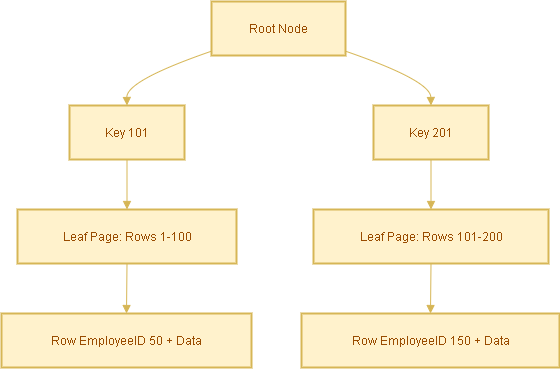
  • The database navigates the clustered index B-tree directly.
  • It finds the row immediately — no extra lookup needed.
  • ✅ Fastest possible lookup.

Case B: Search with Non-Clustered Index

Query:

SELECT * FROM Employees WHERE LastName = 'Smith';

Steps:

  1. Database searches the non-clustered index idx_lastname for ‘Smith’.
  2. Index contains entries like:
    'Smith' → EmployeeID 105
    'Smith' → EmployeeID 256
  3. Database uses the EmployeeID (the clustered index key) to look up the actual row in the table.

This extra step is called a bookmark lookup (or key lookup).

Covering Index Optimization

To avoid the extra lookup, you can create a covering index that includes all required columns.

Query:

SELECT LastName, Email
FROM Employees
WHERE LastName = 'Smith';

Create a covering index:

CREATE INDEX idx_lastname_covering
ON Employees(LastName) INCLUDE (Email);

Now the index already has LastName and Email, so the query is answered directly from the index — no table lookup required.

Analogy to Understand Better

  • Clustered index = A phonebook sorted by last name. You open it and find the full entry directly.
  • Non-clustered index = An index card with a name and a page number. You must still flip to that page to see the full entry.

Summary

  • Clustered Index: Rows are physically stored in order. Direct lookup = fastest.
  • Non-Clustered Index: Separate structure, requires an extra lookup to get the full row.
  • Covering Index: Extends non-clustered indexes by including extra columns to avoid lookups.
Nutshell Series

Data Warehouse Concepts — Nutshell Guide

Introduction

Data warehousing powers reporting and analytics across enterprises. If you’re learning or documenting data warehouse concepts for a WordPress blog, this SEO-optimized post covers the must-know keywords, classification of data (transactional/snapshot/accumulating), dimension behavior (SCD types), and concise examples you can use right away.

Core Concepts

  • Data Warehouse (DW) – Central repository for integrated historical and current data used for reporting and analytics.
  • ETL (Extract, Transform, Load) – Traditional pipeline: extract from sources → transform → load into DW.
  • ELT (Extract, Load, Transform) – Modern approach: load raw data into DW/cloud, then transform inside it.
  • OLTP (Online Transaction Processing) – Systems for day-to-day transactional processing (source systems).
  • OLAP (Online Analytical Processing) – Systems/tools optimized for multi-dimensional analysis and complex queries.

Types of Data Warehouses

  • Enterprise Data Warehouse (EDW) – Organization-wide, authoritative repository.
  • Data Mart – Department-focused subset (e.g., Sales Data Mart).
  • Operational Data Store (ODS) – Near-real-time store for operational reporting and short-term history.
  • Cloud Data Warehouse – Fully-managed cloud services (e.g., Snowflake, BigQuery, Azure Synapse).

Schema & Design

  • Star Schema – One central fact table joined to denormalized dimension tables. Simple and fast for queries.
  • Snowflake Schema – Normalized dimensions that break dimension tables into related tables (more joins).
  • Fact Table – Stores measurements/measurable events (e.g., sales amount, quantity).
  • Dimension Table – Describes context for facts (e.g., Customer, Product, Date).
  • Granularity – Level of detail (e.g., transaction-level vs daily aggregate).

Types of Fact Tables (Data Types)

Fact tables represent events or measures. Main types:

  • Transaction Facts – Each row is an individual event (e.g., a single order line, a payment). High granularity and append-heavy.
  • Snapshot Facts – Captures the state of an entity at a specific time (e.g., month-end balance, daily inventory snapshot).
  • Accumulating Facts – Track lifecycle/process milestones and get updated as steps complete (e.g., order → fulfillment → delivery). Useful to measure elapsed times between milestones.
  • Factless Facts – Records events or coverage without numeric measures (e.g., student attendance, promotion eligibility).

Types of Dimensions

  • Conformed Dimension – Reused across multiple facts/data marts (e.g., a single Customer dimension used by sales and support).
  • Role-Playing Dimension – Same dimension used for multiple roles (e.g., Date as order_date, ship_date, invoice_date).
  • Degenerate Dimension – Dimensionless attributes stored in fact (e.g., invoice number) — no separate dimension table.
  • Junk Dimension – Combines low-cardinality flags and indicators into a single small dimension table to avoid cluttering the fact table with many columns.
  • Slowly Changing Dimension (SCD) – Describes strategies to handle changes to dimension attributes over time. See next section for details.

Slowly Changing Dimensions (SCDs) — Types & Examples

SCDs define how historical changes in dimension attributes are handled. Choose based on analytic requirements and storage:

SCD Type 0 — No Change

The attribute never changes (static). Example: a legacy product code that must remain as originally loaded.

SCD Type 1 — Overwrite

New values overwrite existing records. No history retained. Example: correct a customer’s misspelled name and replace the old value.

SCD Type 2 — Add New Row (Full History)

Each change inserts a new row with effective date range or version key. History preserved. Typical implementation uses effective_from, effective_to or a current flag.

Example: Customer moves city — SCD2 creates a new customer dimension row with a new surrogate key, while the old row stays for historical reporting.

SCD Type 3 — Partial History

Keep limited history by adding columns like previous_value and current_value. Only the last change or limited changes are tracked.

Example: A customer’s previous country and current country stored as separate columns.

Hybrid / Mixed SCD

Combine SCD strategies for different attributes on the same table. E.g., overwrite some fields (Type 1), keep full history for address (Type 2), and store last value for preferred language (Type 3).

Data Types — Logical & Technical

Logical Classification (what the data represents)

  • Fact Data — Measured values (sales amount, clicks).
  • Dimension Data — Descriptive/contextual (product name, customer segment).
  • Aggregated Data — Summaries for performance (daily totals, monthly averages).
  • Operational Data — Near real-time transactional data from source systems.
  • Metadata — Data about data: schema, lineage, source system mapping.

Typical Database Data Types (technical)

  • Numeric – INTEGER, BIGINT, DECIMAL/NUMERIC, FLOAT (quantities, amounts).
  • Character – CHAR, VARCHAR, TEXT (names, descriptions, codes).
  • Date/Time – DATE, TIMESTAMP, DATETIME (order date, event time).
  • Boolean – BOOLEAN / BIT (flags, true/false attributes).
  • Binary / BLOB – Binary large objects for images or files (rare in DW fact/dimension tables).

Processing & Storage

  • Staging Area – Temporary workspace for raw extracts; cleansed before loading into DW.
  • Data Lake – Repository for raw/unstructured/semi-structured data often used as the source for DW/ELT.
  • Cold/Warm/Hot Storage – Classify data by access patterns and cost requirements (hot = frequently accessed).

Performance & Optimization

  • Indexing – Speed up lookups (use carefully on large DW tables).
  • Partitioning – Split large tables by date or key for faster scans and management.
  • Materialized Views – Precomputed query results for faster reporting.
  • Denormalization – Favor read performance for OLAP workloads (e.g., star schema).

Governance & Quality

  • Data Cleansing – Standardize and correct data before it becomes authoritative.
  • Data Lineage – Trace where values came from and how they changed (essential for trust & audits).
  • Master Data Management (MDM) – Centralize canonical entities like customer and product.
  • Data Governance – Policies, roles, and rules to manage data quality, privacy, access and compliance.

Quick Cheatsheet (Table)

Term Short Explanation Example
Transaction Fact Row-per-event with measures. Each order line with price and qty.
Snapshot Fact State captured at a time. Monthly account balances.
Accumulating Fact Progress of a process; rows updated. Order lifecycle status and timestamps.
SCD Type 2 Keep history by adding new rows per change. Customer address history over time.
Conformed Dimension Shared dimension across marts/facts. One Customer table used by Sales & Support.

FAQ

Q: When should I use SCD Type 2 vs Type 1?

A: Use SCD Type 2 when historical accuracy is required (e.g., reporting by customer’s historical region). Use Type 1 when only the latest value matters and history is not needed (e.g., correcting a typo).

Q: Should I store images or documents in the data warehouse?

A: Generally no — store large binaries in object storage (data lake or blob store) and keep references/URLs in the DW.

Conclusion

This post provides a compact but comprehensive reference for data warehouse keywords, fact/dimension types, and SCD strategies. Use it as a template for documentation, training, or as SEO-optimized content for your WordPress blog. If you want, I can also:

  • Convert the cheatsheet into a downloadable CSV
  • Produce simple SVG diagrams for a star schema and SCD Type 2 example
  • Rewrite the post to target a specific keyword phrase (e.g., “datawarehouse SCD guide”)
Nutshell Series

🧠 AI Terminology Cheat Sheet

This cheat sheet provides quick definitions of common AI terms, organized by category for easy reference. Perfect for beginners, students, and professionals looking to refresh their knowledge.

Category Term Definition
⚙️ Core Concepts Artificial Intelligence (AI) Broad field of making machines perform tasks that normally require human intelligence.
Machine Learning (ML) Subset of AI where systems learn from data.
Deep Learning (DL) Subset of ML using multi-layered neural networks.
Neural Network Computational model inspired by the human brain, made of interconnected “neurons.”
Generative AI AI that creates new content (text, images, code, audio).
📚 Learning Paradigms Supervised Learning Training on labeled data (input + known output).
Unsupervised Learning Training on unlabeled data, finding patterns or clusters.
Reinforcement Learning (RL) Model learns by interacting with an environment and receiving rewards/penalties.
Zero-Shot Learning Model solves tasks without examples during training.
One-Shot Learning Model solves tasks after seeing one example.
Few-Shot Learning Model solves tasks after seeing a handful of examples.
Transfer Learning Using a pre-trained model for a related task.
💬 NLP (Natural Language Processing) Token Smallest unit of text AI processes.
Embedding Numeric vector representation of words/sentences for understanding.
Large Language Model (LLM) AI model trained on massive text corpora (e.g., GPT, LLaMA).
Prompt Input text/instructions given to an AI model.
Prompt Engineering Crafting effective prompts for better AI output.
Context Window Maximum amount of input tokens an LLM can handle at once.
Hallucination Confident but incorrect answer generated by AI.
Grounding Linking AI answers to trusted data/sources.
RAG (Retrieval-Augmented Generation) AI retrieves external knowledge before generating answers.
🧮 Model Types CNN (Convolutional Neural Network) Neural network for image processing.
RNN (Recurrent Neural Network) Processes sequential data (text, time series).
Transformer Deep learning architecture powering LLMs (uses attention).
Diffusion Models Generative models for images/audio, working by denoising.
🛠️ Training & Deployment Epoch One full pass through the training dataset.
Overfitting Model memorizes training data but fails on unseen data.
Underfitting Model is too simple, missing patterns.
Fine-Tuning Further training a pre-trained model on specific data.
LoRA (Low-Rank Adaptation) Lightweight fine-tuning method for LLMs.
Inference Using a trained model to make predictions.
Latency Time taken for a model to return results.
⚖️ Ethics & Governance Bias Systematic unfairness in AI outputs due to skewed data.
Explainability (XAI) Techniques to understand AI decisions.
Responsible AI Ensuring AI is fair, accountable, and transparent.
AI Safety Practices ensuring AI doesn’t cause harm.
💬 Conversational AI Agent AI that can act on a user’s behalf (fetch data, perform actions).
Autonomous Workflow AI completes tasks end-to-end without human input.
Conversational Workflow AI interacts in multiple steps, waiting for responses.
Chain-of-Thought Intermediate reasoning steps taken by a model.
Tool/Plugin External capability an LLM can call (API, database).
Nutshell Series

Zero-Shot, One-Shot, and Few-Shot Learning: Explained with Examples

Artificial Intelligence (AI) models—especially Large Language Models (LLMs) like GPT—are powerful because they can solve problems even when they haven’t been directly trained on them. This ability is often described in terms of zero-shot, one-shot, and few-shot learning. Let’s break these concepts down with examples you can relate to.


🔹 Zero-Shot Learning

What it is:
Zero-shot learning means the model is given no examples of a task but is still expected to perform it using general knowledge and instructions.

Analogy:
Imagine being asked to play a new board game just by reading the rulebook, without watching anyone else play.

Example:

Prompt: Translate the sentence “Je suis étudiant” into English.
Answer: “I am a student.”


🔹 One-Shot Learning

What it is:
In one-shot learning, the model is shown one example of how a task is done before being asked to solve a new but similar problem.

Analogy:
Like being shown how to solve one type of math problem and then solving the next one on your own.

Example:

Example: "Translate 'Hola' → 'Hello'"
Now, translate "Adiós".

Answer: “Goodbye.”


🔹 Few-Shot Learning

What it is:
Few-shot learning gives the model several examples (usually 2–10+) so it can learn the task pattern more reliably before attempting a new query.

Analogy:
Like practicing a handful of past exam questions before taking the real test.

Example:

Example 1: "Translate 'Bonjour' → 'Hello'"
Example 2: "Translate 'Merci' → 'Thank you'"
Example 3: "Translate 'Chat' → 'Cat'"
Now, translate "Chien".

Answer: “Dog.”


✅ Summary

Learning Type Examples Provided Strength Use Case
Zero-Shot None Most flexible; relies on general knowledge Text classification, reasoning
One-Shot 1 Learns simple pattern quickly Simple translation, formatting
Few-Shot Few (2–10+) Captures complex patterns better Summarization, style imitation

🌟 Why This Matters

These learning modes are central to how modern AI systems adapt to new tasks. Instead of retraining models for every use case, we can simply provide instructions (zero-shot) or a few examples (one/few-shot). This makes LLMs powerful tools for translation, summarization, customer support, coding help, and much more.

👉 Whether you’re experimenting with AI prompts or building production-ready applications, understanding zero-shot, one-shot, and few-shot learning will help you design smarter and more effective solutions.

Nutshell Series

🛡️ Setting Up a DMZ in Azure: Approaches & Best Practices

A DMZ (Demilitarized Zone) in Azure is a network security boundary where incoming and outgoing internet traffic is inspected and controlled before reaching backend workloads. Unlike on-premises, Azure provides multiple virtualized patterns to achieve the same security principles.


1. DMZ with Azure Firewall (Recommended)

  • Place an Azure Firewall in a Hub VNet (DMZ subnet).
  • All inbound/outbound traffic flows through the firewall.
  • Use DNAT for inbound internet traffic (public IP → private workload).
  • Use SNAT for outbound traffic to hide internal IPs.
  • Combine with Application Gateway (WAF) for L7 protection.

Use case: Centralized security, enterprise landing zones, compliance-heavy apps.


2. DMZ with Network Virtual Appliances (NVA)

  • Deploy 3rd party firewalls (Fortinet, Palo Alto, CheckPoint, Cisco ASA) in a DMZ subnet.
  • NVAs provide advanced features like IPS/IDS and SSL inspection.
  • Route internet traffic → NVA → internal VNets.
  • Requires high availability setup (at least 2 NVAs).

Use case: Enterprises with existing firewall vendor lock-in or advanced packet inspection needs.


3. DMZ using Application Gateway + WAF

  • Use Azure Application Gateway (AGW) with WAF as the public-facing endpoint.
  • Only web workloads (HTTP/HTTPS) are exposed.
  • AGW forwards traffic to backend workloads in private VNets.
  • Can be combined with Azure Firewall for layered security.

Use case: Web applications needing L7 security and SSL offloading.


4. DMZ with Bastion Host for Admin Access

  • Use Azure Bastion instead of exposing RDP/SSH via public IPs.
  • Admins log in securely through the Azure Portal over SSL.
  • No inbound ports (22/3389) exposed to the internet.

Use case: Secure administration of VMs without VPN.


5. DMZ in Hub-and-Spoke Architecture

  • Hub VNet = DMZ containing Azure Firewall, Bastion, VPN/ExpressRoute Gateway.
  • Spoke VNets = Workloads such as apps, databases, and services.
  • Internet and on-prem traffic always flows through the Hub (DMZ).

Use case: Enterprise-scale setups with centralized governance.


6. DMZ with Azure Front Door + WAF

  • Use Azure Front Door (AFD) as the global edge entry point.
  • Provides DDoS protection, WAF, SSL offloading, and global load balancing.
  • AFD forwards traffic → App Gateway/Azure Firewall → backend workloads.

Use case: Global apps needing low latency, DDoS protection, and CDN caching.


🔒 Best Practices for Azure DMZ

  • Enable Azure DDoS Protection on the VNet hosting the DMZ.
  • Use NSGs (Network Security Groups) for subnet-level filtering.
  • Apply User Defined Routes (UDRs) to force traffic through Firewall/NVA.
  • Keep the DMZ in its own subnet, separate from workloads.
  • Log all DMZ traffic to Azure Monitor / Sentinel for auditing.

✅ Summary

  • Modern cloud-native apps: Azure Firewall + Application Gateway (WAF).
  • Web-only apps: Application Gateway WAF or Front Door WAF.
  • Legacy lift-and-shift: NVAs replicate on-prem firewall policies.
  • Enterprise landing zones: Hub-and-Spoke with DMZ hub.
Nutshell Series

🌐 API Architectural Styles — Complete Guide with Examples & Sample Requests

APIs power modern applications and integrations. Choosing the right API style depends on use case, performance needs, security requirements, and client capabilities. This consolidated guide covers the most popular API architectural styles, pros & cons, real-world use cases, and ready-to-use sample requests for each style.


📚 Table of Contents


1️⃣ SOAP (Simple Object Access Protocol)

Overview: Protocol-based, XML-centric, contract-first (WSDL). Strong in enterprise scenarios requiring built-in security, transactions, and formal contracts.

Pros

  • Strongly typed, contract-driven (WSDL)
  • Built-in extensibility and standardized error handling
  • Robust security capabilities (WS-Security)

Cons

  • Verbose XML payloads (larger messages)
  • Slower processing vs lightweight JSON APIs
  • Higher complexity and steeper learning curve

Common Use Cases

Banking, payment gateways, telecom, healthcare and legacy enterprise integrations that require strict contracts and transactional guarantees.

Sample Request (XML over HTTP POST)

POST /PaymentService.asmx HTTP/1.1
Host: bankapi.example.com
Content-Type: text/xml; charset=utf-8
SOAPAction: "http://example.com/ProcessPayment"

<soap:Envelope xmlns:soap="http://schemas.xmlsoap.org/soap/envelope/">
  <soap:Body>
    <ProcessPayment xmlns="http://example.com/">
      <Amount>100.50</Amount>
      <Currency>USD</Currency>
      <AccountId>12345</AccountId>
    </ProcessPayment>
  </soap:Body>
</soap:Envelope>

2️⃣ REST (Representational State Transfer)

Overview: Resource-oriented, uses HTTP verbs (GET/POST/PUT/DELETE). Most commonly returns JSON. Simple, widely-adopted for public and internal APIs.

Pros

  • Simple, well-understood conventions
  • Works naturally with HTTP (status codes, caching, content negotiation)
  • Lightweight JSON payloads easy for browsers and mobile clients

Cons

  • No single strict specification → potential inconsistency in designs
  • Over-fetching or under-fetching of data can occur

Common Use Cases

Public APIs, mobile/web apps, CRUD systems, and microservices exposed to the web.

Sample Request (GET)

GET https://api.github.com/users/octocat/repos
Accept: application/json

Sample Response

[
  {
    "name": "Hello-World",
    "html_url": "https://github.com/octocat/Hello-World"
  }
]

3️⃣ GraphQL

Overview: A query language and runtime that allows clients to request exactly the data they need from a single endpoint. Schema-based and strongly typed.

Pros

  • Client-driven queries reduce over/under-fetching
  • Single endpoint for multiple types of data
  • Introspection and strong type system (schema)

Cons

  • More complex server implementation and caching strategies
  • Potential for expensive/unbounded queries if not controlled

Common Use Cases

Complex UIs (mobile + web) needing flexible data shapes, dashboards, and scenarios where multiple clients require different views of the same data.

Sample Request (GraphQL Query)

POST https://api.example.com/graphql
Content-Type: application/json

{
  "query": "{ user(id: 123) { id name repositories(last: 2) { nodes { name url } } } }"
}

Sample Response

{
  "data": {
    "user": {
      "id": "123",
      "name": "John Doe",
      "repositories": {
        "nodes": [
          { "name": "Hello-World", "url": "https://github.com/octocat/Hello-World" },
          { "name": "Octo-App", "url": "https://github.com/octocat/Octo-App" }
        ]
      }
    }
  }
}

4️⃣ gRPC (Google Remote Procedure Call)

Overview: High-performance RPC framework using Protocol Buffers (Protobuf) for binary serialization. Supports streaming and auto-generated client/server stubs in many languages.

Pros

  • Efficient binary protocol → low latency and high throughput
  • Supports bi-directional streaming
  • Strong typing and automatic code generation from .proto files

Cons

  • Binary messages are not human-readable (harder to debug)
  • Limited direct browser support without gRPC-Web proxy

Common Use Cases

Internal microservices communication, telemetry/IoT, and real-time systems where performance and streaming matter.

Sample Protobuf Definition (.proto)

syntax = "proto3";

service Greeter {
  rpc SayHello (HelloRequest) returns (HelloReply);
}

message HelloRequest {
  string name = 1;
}

message HelloReply {
  string message = 1;
}

Sample Client Call (conceptual)

response = stub.SayHello(HelloRequest(name="Alice"))
print(response.message)  # "Hello Alice"

5️⃣ WebSocket

Overview: Full-duplex, persistent TCP connection allowing server and client to exchange messages in real time after a handshake. Ideal for low-latency interactive apps.

Pros

  • Real-time, bi-directional communication
  • Efficient for frequent updates once connection established

Cons

  • More stateful infrastructure and complexity than stateless HTTP APIs
  • Not ideal for simple CRUD request/response patterns

Common Use Cases

Chat applications, collaborative editing, online multiplayer games, trading platforms, and live dashboards.

Sample Client (JavaScript)

const socket = new WebSocket("wss://chat.example.com/socket");

socket.onopen = () => socket.send("Hello, server!");
socket.onmessage = (event) => console.log("Message:", event.data);

6️⃣ Webhook

Overview: Event-driven pattern where a provider POSTs an event payload to a client-configured HTTP endpoint. Push-based integration that eliminates polling.

Pros

  • Lightweight and event-driven
  • Reduces need for client polling

Cons

  • Requires a reachable endpoint (public or tunneled)
  • Security and delivery guarantees must be handled (signatures, retries)

Common Use Cases

CI/CD triggers, payment notifications, third-party integrations, and automation workflows.

Sample Event (GitHub Webhook POST)

POST /webhook-endpoint HTTP/1.1
Content-Type: application/json

{
  "ref": "refs/heads/main",
  "repository": { "name": "my-repo" },
  "pusher": { "name": "octocat" }
}

7️⃣ OData (Open Data Protocol)

Overview: REST-based protocol that standardizes querying/filtering/sorting of data via URL query options such as $filter, $select and $orderby. Common in enterprise data scenarios.

Pros

  • Rich, standardized query semantics for relational/tabular data
  • Good integration with enterprise tooling (Power BI, Dynamics)

Cons

  • Learning curve for OData conventions
  • Less flexible than GraphQL for deeply nested object graphs

Common Use Cases

Enterprise reporting, analytics, and exposing tabular data from ERP/CRM systems to BI tools.

Sample Request

GET https://services.odata.org/V4/Northwind/Northwind.svc/Products?$select=ProductName,UnitPrice&$filter=UnitPrice gt 50
Accept: application/json

8️⃣ Server-Sent Events (SSE)

Overview: One-way streaming protocol where the server pushes events to the client over HTTP (text/event-stream). Simpler than WebSocket when only server->client updates are needed.

Pros

  • Lightweight and simple for server-to-client streaming
  • Works over standard HTTP and supports reconnection and event IDs

Cons

  • One-way only (client-to-server requires separate channel)
  • Not suitable when bi-directional real-time interaction is required

Common Use Cases

Live feeds, notifications, social feeds, stock tickers, and live-score updates.

Sample Client (JavaScript)

const evtSource = new EventSource("/scores");
evtSource.onmessage = (event) => {
  console.log("Score Update:", event.data);
};

9️⃣ RPC (Remote Procedure Call — JSON-RPC / XML-RPC)

Overview: RPC APIs expose remote procedures that clients invoke like local function calls. Common variants include JSON-RPC (JSON over HTTP) and XML-RPC (XML over HTTP).

Pros

  • Intuitive mapping to function calls
  • Simple for synchronous request/response workflows
  • Easy to implement for small internal services

Cons

  • Tight coupling of client and server contracts
  • Can encourage chatty APIs (many small calls)
  • Less aligned to resource semantics on the web

Common Use Cases

Internal service calls, simple remote invocation, and legacy integrations where a function-call model is preferred.

Sample Request — JSON-RPC

POST /rpc HTTP/1.1
Host: api.example.com
Content-Type: application/json

{
  "jsonrpc": "2.0",
  "method": "getUser",
  "params": { "id": 123 },
  "id": 1
}

Sample Request — XML-RPC

<?xml version="1.0"?>
<methodCall>
  <methodName>getUser</methodName>
  <params>
    <param>
      <value><int>123</int></value>
    </param>
  </params>
</methodCall>

🔟 Message Queue / Pub-Sub (AMQP, MQTT, Kafka)

Overview: Messaging and pub-sub architectures decouple producers and consumers via queues/topics. Examples: RabbitMQ (AMQP), MQTT (IoT), Apache Kafka (streaming).

Pros

  • Loose coupling and asynchronous processing
  • Resilient and scalable — can buffer spikes
  • Supports pub/sub broadcast and point-to-point queueing

Cons

  • Operational complexity (broker management, scaling)
  • Eventual consistency and added complexity for transactions
  • Distributed tracing and debugging can be harder

Common Use Cases

Event-driven systems, IoT telemetry ingestion, order processing, logging/telemetry, and decoupled microservices.

Sample Publish — MQTT (CLI)

mosquitto_pub -h broker.example.com -t "orders" -m '{ "orderId": 123, "amount": 100.50 }'

Sample Publish — Kafka (kcat)

echo '{ "orderId": 123, "amount": 100.50 }' | kcat -b broker:9092 -t orders -P

Sample Message (JSON payload)

{
  "orderId": 123,
  "status": "created",
  "items": [
    { "sku": "ABC123", "qty": 2 }
  ]
}

🏁 Summary — When to Use Which

  • SOAP: Enterprise systems needing strict contracts, transactions, and WS-Security.
  • REST: General-purpose web APIs, CRUD, mobile/web frontends.
  • GraphQL: Flexible, client-driven data fetching for complex UI needs.
  • gRPC: High-performance internal microservices and streaming.
  • WebSocket: Real-time bi-directional applications (chat, gaming, trading).
  • Webhook: Event-driven integrations where providers push events to consumers.
  • OData: Data-centric APIs with standardized query semantics (enterprise reporting).
  • SSE: Lightweight server->client streaming (live feeds, notifications).
  • RPC: Simple remote procedure calls (JSON-RPC, XML-RPC) for function-like APIs.
  • Messaging / Pub-Sub: Asynchronous, decoupled event-driven systems at scale.

🔧 Practical Tips

  • Design APIs with security first: TLS, authentication, authorization, and rate-limiting.
  • Use appropriate schemas/contracts: OpenAPI for REST, GraphQL schemas, Protobuf for gRPC.
  • Isolate internal and external APIs: public-facing endpoints often differ from internal service protocols (e.g., REST vs gRPC).
  • For event-driven systems favor push patterns (webhooks, messaging, event grid) over polling.
  • Plan for observability: structured logging, distributed tracing, and metrics for async and streaming systems.
  • Choose data formats appropriate to clients: JSON for browsers, Protobuf for high-performance internal services.

📚 Further Reading & Tools

  • OpenAPI (Swagger) for REST design
  • GraphQL specification and Apollo tooling
  • gRPC & Protocol Buffers documentation
  • Kafka, RabbitMQ, MQTT docs for messaging patterns
  • Resources on WebSocket vs SSE trade-offs
  • OData specification & Microsoft docs

Nutshell Series

🚀 Software Design Principles Every Developer Should Know

Good software design isn’t just about writing code that works — it’s about writing clean, maintainable, and scalable code.
To achieve this, developers follow a set of guiding principles that help keep complexity low and quality high.
Here’s a consolidated list of the most important software design principles with explanations and C# examples.


1. 🧩 KISS (Keep It Simple, Stupid)

The KISS principle reminds us to keep software as simple as possible. Avoid unnecessary complexity, write clear code, and focus only on what’s needed.

// ❌ Bad: Over-engineered
if (user.Age > 18 && (user.Country == "US" || user.Country == "UK" || user.Country == "CA"))
{
    AllowAccess();
}
else
{
    DenyAccess();
}

// ✅ Good: Simple and clear
if (user.IsAdult())
{
    AllowAccess();
}

2. 🔁 DRY (Don’t Repeat Yourself)

The DRY principle means you should avoid code duplication.
Instead, encapsulate common logic in functions, classes, or constants.

// ❌ Bad: Duplicate logic
Console.WriteLine("Welcome, John");
Console.WriteLine("Welcome, Mary");

// ✅ Good: Reusable method
void Greet(string name)
{
    Console.WriteLine($"Welcome, {name}");
}

Greet("John");
Greet("Mary");

3. 🚫 YAGNI (You Aren’t Gonna Need It)

Don’t implement features “just in case.” Only build what you need now to keep the system simple and maintainable.

// ❌ Bad: Adding unnecessary parameters for future features
decimal CalculateDiscount(decimal price, string type = "standard", int loyaltyPoints = 0, bool seasonal = false, bool futureFeature = false)
{
    // Too much complexity
    return price;
}

// ✅ Good: Only what is needed now
decimal CalculateDiscount(decimal price, string type = "standard")
{
    return price;
}

4. 📐 SOLID Principles

SOLID is a collection of five principles for building maintainable and extensible object-oriented software:

  • Single Responsibility Principle (SRP): A class should have only one reason to change.
  • Open/Closed Principle (OCP): Classes should be open for extension but closed for modification.
  • Liskov Substitution Principle (LSP): Subclasses should be usable in place of their base classes.
  • Interface Segregation Principle (ISP): Clients shouldn’t be forced to depend on methods they don’t use.
  • Dependency Inversion Principle (DIP): Depend on abstractions, not concrete implementations.
// ✅ Example: Dependency Inversion
public interface IMessageService
{
    void Send(string message);
}

public class EmailService : IMessageService
{
    public void Send(string message) 
    {
        Console.WriteLine($"Email sent: {message}");
    }
}

public class Notification
{
    private readonly IMessageService _service;

    public Notification(IMessageService service)
    {
        _service = service;
    }

    public void Notify(string message)
    {
        _service.Send(message);
    }
}

// Usage
var emailService = new EmailService();
var notification = new Notification(emailService);
notification.Notify("Hello, World!");

5. 🤔 Principle of Least Astonishment (POLA)

Software should behave in a way that is consistent with user expectations.
Use familiar terminology, intuitive design, and clear error messages.

// ❌ Bad: Confusing error
throw new Exception("ERR_451_USER_FAIL");

// ✅ Good: Clear error
throw new UnauthorizedAccessException("User authentication failed. Please check your password.");

6. 🧱 Principle of Modularity

Design software as independent, reusable modules. This makes it easier to maintain, test, and scale.

// Example project structure
- Auth/
- Payment/
- Notifications/

7. 🎭 Principle of Abstraction

Hide unnecessary details and expose only essential features.
Abstraction helps simplify usage and prevents users from depending on internal complexity.

public class EmailSender
{
    public void SendEmail(string to, string subject, string body)
    {
        // Hides SMTP details
        Console.WriteLine($"Sending email to {to}: {subject}");
    }
}

8. 🔒 Principle of Encapsulation

Encapsulation hides the internal state of an object and exposes behavior only through well-defined interfaces.

public class BankAccount
{
    private decimal _balance;

    public void Deposit(decimal amount)
    {
        _balance += amount;
    }

    public decimal GetBalance()
    {
        return _balance;
    }
}

9. 📉 Principle of Least Knowledge (Law of Demeter)

A module should know as little as possible about other modules. This reduces coupling and increases flexibility.

// ❌ Bad: Too much knowledge
var creditLimit = order.Customer.Account.CreditLimit;

// ✅ Good: Ask the object directly
var creditLimit = order.GetCustomerCreditLimit();

10. 🔗 Low Coupling & High Cohesion

Low Coupling: Modules should have minimal dependencies on each other.
High Cohesion: Each module should serve a single, well-defined purpose.

// ✅ Example: High cohesion, low coupling
public class InvoiceGenerator
{
    public string Generate(Order order)
    {
        return $"Invoice for {order.Id}";
    }
}

public class EmailService
{
    public void SendInvoice(string invoice)
    {
        Console.WriteLine($"Invoice sent: {invoice}");
    }
}

🎯 Conclusion

These principles are not strict rules but guidelines to help you write clean, scalable, and maintainable software.
By applying KISS, DRY, YAGNI, SOLID, and others consistently, you’ll reduce bugs, simplify maintenance, and build systems that are easier to extend as requirements evolve.

Nutshell Series

📘 Terraform Commands Cheatsheet

Terraform is a popular Infrastructure-as-Code (IaC) tool that lets you provision and manage infrastructure efficiently.
This cheatsheet covers the most common and essential Terraform CLI commands, grouped by category for quick reference.


🚀 Getting Started

terraform -help                   # Show all commands
terraform version                 # Show current Terraform version
terraform -install-autocomplete   # Enable shell autocomplete

📦 Initialization

Initialize a working directory containing Terraform configuration files.

terraform init           # Initialize Terraform in the current directory
terraform init -upgrade  # Re-download modules/providers with the latest versions

✅ Validate & Format

terraform validate       # Check if configuration is valid
terraform fmt            # Format .tf files to canonical style
terraform fmt -recursive # Format files in all subdirectories
terraform fmt -check     # Checks if all files are formatted

📋 Plan & Apply

terraform plan                  # Show what changes will be applied
terraform plan -out=tfplan      # Save plan to a file
terraform apply                 # Apply changes
terraform apply tfplan          # Apply saved plan
terraform apply -auto-approve   # Apply without asking for confirmation

🔥 Destroy

terraform destroy                 # Destroy infrastructure
terraform destroy -auto-approve   # Destroy without confirmation

📂 State Management

Inspect and modify Terraform’s state file.

terraform state list             # List resources in state
terraform state show <address>   # Show resource details
terraform state rm <address>     # Remove a resource from state
terraform state mv <src> <dest>  # Move resource in state

🌎 Workspaces

Workspaces let you manage multiple environments (e.g., dev, staging, prod).

terraform workspace list        # List all workspaces
terraform workspace show        # Show current workspace
terraform workspace new dev     # Create a new workspace
terraform workspace select dev  # Switch to a workspace

🔌 Providers & Modules

terraform providers          # Show required providers
terraform providers mirror ./mirror-dir   # Download provider plugins
terraform get                # Download and update modules
terraform get -update        # Re-fetch modules

🛠 Debugging & Misc

terraform graph              # Generate dependency graph (DOT format)
terraform refresh            # Update state with real infrastructure
terraform output             # Show outputs from configuration
terraform output             # Show specific output
TF_LOG=DEBUG terraform plan  # Enable debug logging

📑 Quick Workflow Example

terraform init
terraform validate
terraform plan -out=tfplan
terraform apply tfplan
terraform output
terraform destroy

🚀 Conclusion

This cheatsheet provides a quick reference for everyday Terraform usage.
From init to destroy, mastering these commands will speed up your infrastructure automation workflow.
Bookmark this page and use it as your go-to Terraform CLI reference!