Nutshell Series

Clustered vs Non-Clustered Index in SQL – Nutshell Guide

Indexes are the backbone of query performance in relational databases. But not all indexes are the same — clustered and non-clustered indexes work differently. In this blog, we’ll break down both types with real-world examples and explain how searching actually works.

What is a Clustered Index?

  • A clustered index defines the physical order of rows in the table.
  • There can be only one clustered index per table (since rows can only be stored in one order).
  • In many databases, the PRIMARY KEY automatically becomes the clustered index.

Example:

CREATE TABLE Employees (
  EmployeeID INT PRIMARY KEY,   -- Clustered index by default
  FirstName VARCHAR(50),
  LastName VARCHAR(50),
  DepartmentID INT,
  Email VARCHAR(100)
);

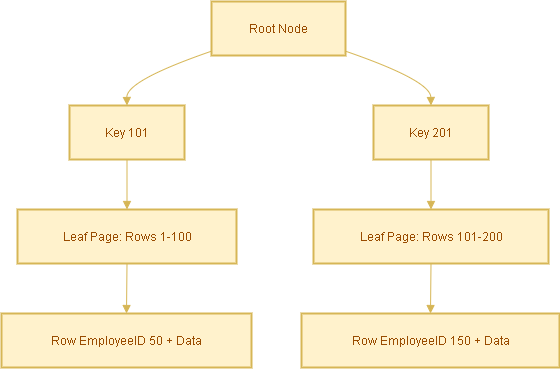
Here, EmployeeID is the clustered index. Rows are physically stored sorted by EmployeeID.

What is a Non-Clustered Index?

  • A non-clustered index is a separate structure from the table.
  • It stores the indexed column(s) plus a row locator (pointer) to the actual data row.
  • You can create multiple non-clustered indexes on a table.

Example:

CREATE INDEX idx_lastname ON Employees(LastName);

Now, searches on LastName will use this non-clustered index.

How Searching Works in Each Case

Case A: Search with Clustered Index

Query:

SELECT * FROM Employees WHERE EmployeeID = 105;

Because EmployeeID is the clustered index:

  • The database navigates the clustered index B-tree directly.
  • It finds the row immediately — no extra lookup needed.
  • ✅ Fastest possible lookup.

Case B: Search with Non-Clustered Index

Query:

SELECT * FROM Employees WHERE LastName = 'Smith';

Steps:

  1. Database searches the non-clustered index idx_lastname for ‘Smith’.
  2. Index contains entries like:
    'Smith' → EmployeeID 105
    'Smith' → EmployeeID 256
  3. Database uses the EmployeeID (the clustered index key) to look up the actual row in the table.

This extra step is called a bookmark lookup (or key lookup).

Covering Index Optimization

To avoid the extra lookup, you can create a covering index that includes all required columns.

Query:

SELECT LastName, Email
FROM Employees
WHERE LastName = 'Smith';

Create a covering index:

CREATE INDEX idx_lastname_covering
ON Employees(LastName) INCLUDE (Email);

Now the index already has LastName and Email, so the query is answered directly from the index — no table lookup required.

Analogy to Understand Better

  • Clustered index = A phonebook sorted by last name. You open it and find the full entry directly.
  • Non-clustered index = An index card with a name and a page number. You must still flip to that page to see the full entry.

Summary

  • Clustered Index: Rows are physically stored in order. Direct lookup = fastest.
  • Non-Clustered Index: Separate structure, requires an extra lookup to get the full row.
  • Covering Index: Extends non-clustered indexes by including extra columns to avoid lookups.
Nutshell Series

Data Warehouse Concepts — Nutshell Guide

Introduction

Data warehousing powers reporting and analytics across enterprises. If you’re learning or documenting data warehouse concepts for a WordPress blog, this SEO-optimized post covers the must-know keywords, classification of data (transactional/snapshot/accumulating), dimension behavior (SCD types), and concise examples you can use right away.

Core Concepts

  • Data Warehouse (DW) – Central repository for integrated historical and current data used for reporting and analytics.
  • ETL (Extract, Transform, Load) – Traditional pipeline: extract from sources → transform → load into DW.
  • ELT (Extract, Load, Transform) – Modern approach: load raw data into DW/cloud, then transform inside it.
  • OLTP (Online Transaction Processing) – Systems for day-to-day transactional processing (source systems).
  • OLAP (Online Analytical Processing) – Systems/tools optimized for multi-dimensional analysis and complex queries.

Types of Data Warehouses

  • Enterprise Data Warehouse (EDW) – Organization-wide, authoritative repository.
  • Data Mart – Department-focused subset (e.g., Sales Data Mart).
  • Operational Data Store (ODS) – Near-real-time store for operational reporting and short-term history.
  • Cloud Data Warehouse – Fully-managed cloud services (e.g., Snowflake, BigQuery, Azure Synapse).

Schema & Design

  • Star Schema – One central fact table joined to denormalized dimension tables. Simple and fast for queries.
  • Snowflake Schema – Normalized dimensions that break dimension tables into related tables (more joins).
  • Fact Table – Stores measurements/measurable events (e.g., sales amount, quantity).
  • Dimension Table – Describes context for facts (e.g., Customer, Product, Date).
  • Granularity – Level of detail (e.g., transaction-level vs daily aggregate).

Types of Fact Tables (Data Types)

Fact tables represent events or measures. Main types:

  • Transaction Facts – Each row is an individual event (e.g., a single order line, a payment). High granularity and append-heavy.
  • Snapshot Facts – Captures the state of an entity at a specific time (e.g., month-end balance, daily inventory snapshot).
  • Accumulating Facts – Track lifecycle/process milestones and get updated as steps complete (e.g., order → fulfillment → delivery). Useful to measure elapsed times between milestones.
  • Factless Facts – Records events or coverage without numeric measures (e.g., student attendance, promotion eligibility).

Types of Dimensions

  • Conformed Dimension – Reused across multiple facts/data marts (e.g., a single Customer dimension used by sales and support).
  • Role-Playing Dimension – Same dimension used for multiple roles (e.g., Date as order_date, ship_date, invoice_date).
  • Degenerate Dimension – Dimensionless attributes stored in fact (e.g., invoice number) — no separate dimension table.
  • Junk Dimension – Combines low-cardinality flags and indicators into a single small dimension table to avoid cluttering the fact table with many columns.
  • Slowly Changing Dimension (SCD) – Describes strategies to handle changes to dimension attributes over time. See next section for details.

Slowly Changing Dimensions (SCDs) — Types & Examples

SCDs define how historical changes in dimension attributes are handled. Choose based on analytic requirements and storage:

SCD Type 0 — No Change

The attribute never changes (static). Example: a legacy product code that must remain as originally loaded.

SCD Type 1 — Overwrite

New values overwrite existing records. No history retained. Example: correct a customer’s misspelled name and replace the old value.

SCD Type 2 — Add New Row (Full History)

Each change inserts a new row with effective date range or version key. History preserved. Typical implementation uses effective_from, effective_to or a current flag.

Example: Customer moves city — SCD2 creates a new customer dimension row with a new surrogate key, while the old row stays for historical reporting.

SCD Type 3 — Partial History

Keep limited history by adding columns like previous_value and current_value. Only the last change or limited changes are tracked.

Example: A customer’s previous country and current country stored as separate columns.

Hybrid / Mixed SCD

Combine SCD strategies for different attributes on the same table. E.g., overwrite some fields (Type 1), keep full history for address (Type 2), and store last value for preferred language (Type 3).

Data Types — Logical & Technical

Logical Classification (what the data represents)

  • Fact Data — Measured values (sales amount, clicks).
  • Dimension Data — Descriptive/contextual (product name, customer segment).
  • Aggregated Data — Summaries for performance (daily totals, monthly averages).
  • Operational Data — Near real-time transactional data from source systems.
  • Metadata — Data about data: schema, lineage, source system mapping.

Typical Database Data Types (technical)

  • Numeric – INTEGER, BIGINT, DECIMAL/NUMERIC, FLOAT (quantities, amounts).
  • Character – CHAR, VARCHAR, TEXT (names, descriptions, codes).
  • Date/Time – DATE, TIMESTAMP, DATETIME (order date, event time).
  • Boolean – BOOLEAN / BIT (flags, true/false attributes).
  • Binary / BLOB – Binary large objects for images or files (rare in DW fact/dimension tables).

Processing & Storage

  • Staging Area – Temporary workspace for raw extracts; cleansed before loading into DW.
  • Data Lake – Repository for raw/unstructured/semi-structured data often used as the source for DW/ELT.
  • Cold/Warm/Hot Storage – Classify data by access patterns and cost requirements (hot = frequently accessed).

Performance & Optimization

  • Indexing – Speed up lookups (use carefully on large DW tables).
  • Partitioning – Split large tables by date or key for faster scans and management.
  • Materialized Views – Precomputed query results for faster reporting.
  • Denormalization – Favor read performance for OLAP workloads (e.g., star schema).

Governance & Quality

  • Data Cleansing – Standardize and correct data before it becomes authoritative.
  • Data Lineage – Trace where values came from and how they changed (essential for trust & audits).
  • Master Data Management (MDM) – Centralize canonical entities like customer and product.
  • Data Governance – Policies, roles, and rules to manage data quality, privacy, access and compliance.

Quick Cheatsheet (Table)

Term Short Explanation Example
Transaction Fact Row-per-event with measures. Each order line with price and qty.
Snapshot Fact State captured at a time. Monthly account balances.
Accumulating Fact Progress of a process; rows updated. Order lifecycle status and timestamps.
SCD Type 2 Keep history by adding new rows per change. Customer address history over time.
Conformed Dimension Shared dimension across marts/facts. One Customer table used by Sales & Support.

FAQ

Q: When should I use SCD Type 2 vs Type 1?

A: Use SCD Type 2 when historical accuracy is required (e.g., reporting by customer’s historical region). Use Type 1 when only the latest value matters and history is not needed (e.g., correcting a typo).

Q: Should I store images or documents in the data warehouse?

A: Generally no — store large binaries in object storage (data lake or blob store) and keep references/URLs in the DW.

Conclusion

This post provides a compact but comprehensive reference for data warehouse keywords, fact/dimension types, and SCD strategies. Use it as a template for documentation, training, or as SEO-optimized content for your WordPress blog. If you want, I can also:

  • Convert the cheatsheet into a downloadable CSV
  • Produce simple SVG diagrams for a star schema and SCD Type 2 example
  • Rewrite the post to target a specific keyword phrase (e.g., “datawarehouse SCD guide”)
Nutshell Series

☁️ Cloud Migration Strategies in a Nutshell


Thinking about moving to the cloud? There’s more than one way to get there. Each migration approach has its own pros, cons, and ideal use cases. In this post, we’ll break down six major cloud migration strategies that organizations use to transition smoothly and smartly.


🧱 1. Lift and Shift (Rehost)

Move it as-is. This strategy involves migrating your existing apps to the cloud without any code changes.

  • ✅ Fastest method
  • ✅ No code changes
  • ❌ Doesn’t leverage cloud-native benefits
  • Best for: Legacy apps or fast migrations

🛠️ 2. Replatform

Tweak a little. Make minor changes to use managed cloud services (like migrating from on-prem SQL Server to Azure SQL Database).

  • ✅ Better performance
  • ✅ Less maintenance
  • ❌ Still not fully cloud-native
  • Best for: Apps needing light optimization

🔁 3. Refactor (Re-architect)

Redesign for the cloud. This involves reworking app architecture to use microservices, containers, or serverless technologies.

  • ✅ Maximum scalability and cloud benefits
  • ✅ Future-proof architecture
  • ❌ Higher cost and complexity
  • Best for: Strategic modernization of core systems

🛍️ 4. Repurchase

Buy new (SaaS). Replace your existing app with a SaaS solution, like moving to Salesforce or Microsoft 365.

  • ✅ Low maintenance
  • ✅ Fastest implementation
  • ❌ Limited customizability
  • Best for: Standard tools like CRM, HR, or Email

🗑️ 5. Retire

Let it go. Identify and decommission apps that are no longer used or necessary.

  • ✅ Saves cost
  • ✅ Reduces system clutter
  • ❌ Risk of dependencies
  • Best for: Obsolete or duplicate applications

⏳ 6. Retain

Keep it on-prem for now. Retain certain applications that are not ready for the cloud due to business or technical constraints.

  • ✅ Safe for sensitive workloads
  • ❌ Misses out on cloud benefits
  • Best for: Apps with regulatory or latency concerns

📊 Quick Comparison Table

Strategy Code Change Speed Cloud Benefits Best For
Lift & Shift ❌ None 🟢 Fast 🔴 Low Legacy/Quick Wins
Replatform ⚠️ Minor 🟡 Medium 🟡 Partial Light Optimization
Refactor ✅ High 🔴 Slow 🟢 Full Strategic Modernization
Repurchase ❌ None 🟢 Fast 🟢 Full (SaaS) Commodity Tools
Retire ❌ N/A 🟢 Fast 🔴 N/A Unused Systems
Retain ❌ N/A N/A 🔴 None Critical On-Prem Apps
SQL

SQL Isolation Levels

In the SQL Server database, isolation levels determine how concurrent transactions play with each other.  They control the locking behavior of a transaction, including what kind of locks, if any, are requested on a resource, as well as how long those locks are maintained.  The isolation level also controls how we see data that is being modified by another process.

Concurrency side effects

Ideally, you want an isolation level that incurs the minimum amount of locking possible, and still gets you committed data in an acceptable timeframe.  With potentially hundreds of processes all accessing the same data, this is no small request.  There are a few potential side effects to concurrency, such as dirty reads, phantom reads, and blocking.

Dirty reads – reads on data that has been modifed by another transaction but not yet committed.  If the modifying transaction ends up getting rolled back, the reading transaction has invalid (aka dirty) data.

Phantom reads – when one transaction accesses the same set of data more than once and between those reads another transaction modifies that same data.  This can cause records to appear/disappear from one read to another.

Blocking – when one transaction holds a lock on a resource and another transaction tries to obtain an incompatible lock on the same resource.  For example, if both transactions try to lock a record exclusively.  The second transaction will be blocked by the first, and will have to wait until the first lock is released.

[Note: particular scenario of at least two resources Blocking the same data results in the other type of locking called as Deadlocks]

There are three type of locks need to be understood

  1. Shared Locks
  2. Exclusive Locks
  3. Update Locks

A Shared lock is obtained when the SELECT statement is executed. SELECT statement doesn’t do any changes to the data, hence there can multiple shared locks on a single resource at any time.

A Exclusive lock is obtained when the INSERT or DELETE statement is executed. The exclusive lock will prevent any other connection from accessing the locked resource until it is lock released. There can be only one Exclusive lock against any resource.

A Update Lock occurs when the UPDATE statement is executed. It can be considered as an special case of shared lock along with exclusive lock.

further, there can be only one type of lock can be allocated to any resource at one time. for example, if shared lock is allocation then exclusive lock cannot be allocation and vice verse.

Before understanding the isolation levels, the above terms needs to be understood thoroughly.

Isolation Levels

Let’s start with an overview of the isolation levels available in SQL Server.  The first is Read Uncommitted.  Read uncommitted is the lowest isolation level, and the only thing is ensures is that the data you’re reading isn’t physically corrupt.  Read uncommitted transactions do not issue any shared locks on the data being read.  Therefore they do not block other transactions, nor are they blocked, even by other transactions’ exclusive locks.  Therefore, with read uncommitted isolation you’re susceptible to dirty and phantom reads, but if you have a long-running query, this level is the least likely to cause blocking problems.

The next isolation level is Read Committed.  Read committed is the default isolation level in SQL Server.  It ensures that the data being read is committed, thereby eliminating the possibility of dirty reads.  However, it does not eliminate phantom reads.  Shared locks are issued on rows being read, so this level can cause blocking for other transactions attemting to modify that data.

Repeatable read isolation eliminates dirty and, to a degree, phantom reads.  Shared locks are placed on all data being read and are maintained until the transaction is committed or rolled back.  This prevents data from disappearing or changing between individual reads.  However another transaction can always insert new records that meet your criteria, and you’ll suddenly have additional rows in your dataset.  You want to be careful to use repeatable read only where necessary, as long-running transactions can end up blocking other processes for quite a while.

If you’re familiar with Oracle databases, Snapshot isolation will sound familiar.  Snapshot isolation ensures that all data read by a transaction will be a consistent version of the data as it existed at the start of the transaction.  It does not issue locks on read requests, thus it doesn’t block other transactions.  With snapshot isolation, there are no dirty reads and no phantom reads, either.  How does SQL Server do it?  Row versioning.  Row versions of changed data are maintained in Tempdb with a transaction sequence number.  So make sure you have adequate space in tempdb if you decide Snapshot isolation is right for you.

The last, and most restrictive, isolation level is Serializable.  With Serializable isolation, uncommitted data isn’t read (so no dirty reads), data being read cannot be modified by other transactions, and new data cannot be inserted if it will fall inside the dataset of this transaction (so no phantom reads).  SQL Server accomplishes this by issuing range locks on the data being used by this transaction.  Like repeatable read, this level should only be used when absolutely necessary.