What is a Clustered Index?
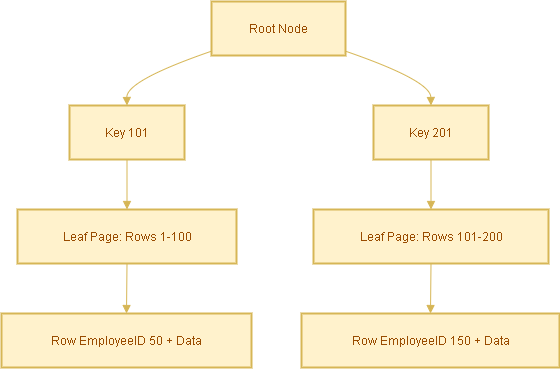
- A clustered index defines the physical order of rows in the table.
- There can be only one clustered index per table (since rows can only be stored in one order).
- In many databases, the PRIMARY KEY automatically becomes the clustered index.
Example:
CREATE TABLE Employees (
  EmployeeID INT PRIMARY KEY,   -- Clustered index by default
  FirstName VARCHAR(50),
  LastName VARCHAR(50),
  DepartmentID INT,
  Email VARCHAR(100)
);
Here, EmployeeID is the clustered index. Rows are physically stored sorted by EmployeeID.
What is a Non-Clustered Index?
- A non-clustered index is a separate structure from the table.
- It stores the indexed column(s) plus a row locator (pointer) to the actual data row.
- You can create multiple non-clustered indexes on a table.
Example:
CREATE INDEX idx_lastname ON Employees(LastName);
Now, searches on LastName will use this non-clustered index.
How Searching Works in Each Case
Case A: Search with Clustered Index
Query:
SELECT * FROM Employees WHERE EmployeeID = 105;Because EmployeeID is the clustered index:
- The database navigates the clustered index B-tree directly.
- It finds the row immediately — no extra lookup needed.
- ✅ Fastest possible lookup.

Case B: Search with Non-Clustered Index
Query:
SELECT * FROM Employees WHERE LastName = 'Smith';Steps:
- Database searches the non-clustered index
idx_lastnamefor ‘Smith’. - Index contains entries like:
'Smith' → EmployeeID 105
'Smith' → EmployeeID 256 - Database uses the
EmployeeID(the clustered index key) to look up the actual row in the table.

This extra step is called a bookmark lookup (or key lookup).
Covering Index Optimization
To avoid the extra lookup, you can create a covering index that includes all required columns.
Query:
SELECT LastName, Email
FROM Employees
WHERE LastName = 'Smith';
Create a covering index:
CREATE INDEX idx_lastname_covering
ON Employees(LastName) INCLUDE (Email);
Now the index already has LastName and Email, so the query is answered directly from the index — no table lookup required.
Analogy to Understand Better
- Clustered index = A phonebook sorted by last name. You open it and find the full entry directly.
- Non-clustered index = An index card with a name and a page number. You must still flip to that page to see the full entry.
Summary
- Clustered Index: Rows are physically stored in order. Direct lookup = fastest.
- Non-Clustered Index: Separate structure, requires an extra lookup to get the full row.
- Covering Index: Extends non-clustered indexes by including extra columns to avoid lookups.
 Techy Chalkboard in bits and pieces
You must be logged in to post a comment.