Nutshell Series

Complete Guide to Service Status Pages of Popular services

When working with Microsoft cloud services such as Azure, Microsoft 365, Visual Studio, or GitHub or any other services, it’s important to know where to check the official status dashboards. These pages help you quickly confirm whether an issue is on your side or a wider service outage.

Below is a consolidated table of the official status and health pages you should bookmark.

Service Status Page Notes
Azure Azure Status Dashboard
Azure Service Health
Azure Resource Health
Global real-time status of all Azure services by region.
Service Health
Resource Health
Azure (Personalized) Azure Service Health (Portal) Requires login; shows service health specific to your subscriptions.
Microsoft 365 / Office 365 Microsoft 365 Admin Center Admin-only; covers Exchange Online, SharePoint, Teams, OneDrive, etc.
Microsoft 365 (Public) Microsoft Cloud Status Broad incidents affecting Microsoft 365 services.
Microsoft 365 Updates @MSFT365Status on X/Twitter Official updates on outages and recovery progress.
Visual Studio Visual Studio Service Status Tracks licensing and Visual Studio service availability.
Azure DevOps Azure DevOps Status Shows pipelines, repos, artifacts, and test plan health.
GitHub GitHub Status Monitors repositories, Actions, Codespaces, Packages, etc.
Dynamics 365 Dynamics 365 Status Service health and incidents for Dynamics 365 apps.
Power Platform Power Platform Status Real-time health for Power BI, Power Apps, Power Automate, and Power Virtual Agents.
Xbox Live Xbox Status Tracks Xbox Live, Game Pass, multiplayer, and account service health.
Office Connectivity Office Connectivity Status Office Connectivity
Jira / Atlassian Atlassian Status Page Tracks Jira, Confluence, Bitbucket, Trello, and other Atlassian cloud services.
Slack Slack Status Real-time status of messaging, calls, and integrations.
Google Workspace Google Workspace Status Shows health of Gmail, Drive, Docs, Calendar, Meet, and more.
AWS AWS Service Health Dashboard Regional health information for EC2, S3, RDS, Lambda, and other AWS services.
Zoom Zoom Status Monitors meetings, chat, phone, and webinar services.
Dropbox Dropbox Status Tracks cloud file storage and sync service health.
Salesforce Salesforce Status Service health for Sales Cloud, Service Cloud, Marketing Cloud, and more.
Zendesk Zendesk Status Tracks helpdesk, chat, and CRM services.

Why These Status Pages Matter

Whenever you face connectivity issues, sign-in failures, or downtime in Microsoft services, checking these official dashboards should be your first step. They help distinguish between a local setup problem and a wider outage.

Bookmark these links to save troubleshooting time and stay informed about Microsoft and GitHub service health.
Nutshell Series

Clustered vs Non-Clustered Index in SQL – Nutshell Guide

Indexes are the backbone of query performance in relational databases. But not all indexes are the same — clustered and non-clustered indexes work differently. In this blog, we’ll break down both types with real-world examples and explain how searching actually works.

What is a Clustered Index?

  • A clustered index defines the physical order of rows in the table.
  • There can be only one clustered index per table (since rows can only be stored in one order).
  • In many databases, the PRIMARY KEY automatically becomes the clustered index.

Example:

CREATE TABLE Employees (
  EmployeeID INT PRIMARY KEY,   -- Clustered index by default
  FirstName VARCHAR(50),
  LastName VARCHAR(50),
  DepartmentID INT,
  Email VARCHAR(100)
);

Here, EmployeeID is the clustered index. Rows are physically stored sorted by EmployeeID.

What is a Non-Clustered Index?

  • A non-clustered index is a separate structure from the table.
  • It stores the indexed column(s) plus a row locator (pointer) to the actual data row.
  • You can create multiple non-clustered indexes on a table.

Example:

CREATE INDEX idx_lastname ON Employees(LastName);

Now, searches on LastName will use this non-clustered index.

How Searching Works in Each Case

Case A: Search with Clustered Index

Query:

SELECT * FROM Employees WHERE EmployeeID = 105;

Because EmployeeID is the clustered index:

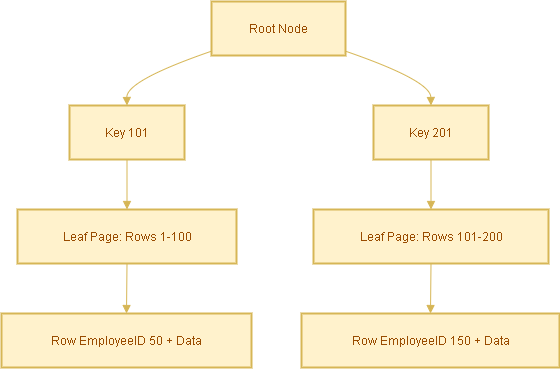
  • The database navigates the clustered index B-tree directly.
  • It finds the row immediately — no extra lookup needed.
  • ✅ Fastest possible lookup.

Case B: Search with Non-Clustered Index

Query:

SELECT * FROM Employees WHERE LastName = 'Smith';

Steps:

  1. Database searches the non-clustered index idx_lastname for ‘Smith’.
  2. Index contains entries like:
    'Smith' → EmployeeID 105
    'Smith' → EmployeeID 256
  3. Database uses the EmployeeID (the clustered index key) to look up the actual row in the table.

This extra step is called a bookmark lookup (or key lookup).

Covering Index Optimization

To avoid the extra lookup, you can create a covering index that includes all required columns.

Query:

SELECT LastName, Email
FROM Employees
WHERE LastName = 'Smith';

Create a covering index:

CREATE INDEX idx_lastname_covering
ON Employees(LastName) INCLUDE (Email);

Now the index already has LastName and Email, so the query is answered directly from the index — no table lookup required.

Analogy to Understand Better

  • Clustered index = A phonebook sorted by last name. You open it and find the full entry directly.
  • Non-clustered index = An index card with a name and a page number. You must still flip to that page to see the full entry.

Summary

  • Clustered Index: Rows are physically stored in order. Direct lookup = fastest.
  • Non-Clustered Index: Separate structure, requires an extra lookup to get the full row.
  • Covering Index: Extends non-clustered indexes by including extra columns to avoid lookups.
Nutshell Series

Data Warehouse Concepts — Nutshell Guide

Introduction

Data warehousing powers reporting and analytics across enterprises. If you’re learning or documenting data warehouse concepts for a WordPress blog, this SEO-optimized post covers the must-know keywords, classification of data (transactional/snapshot/accumulating), dimension behavior (SCD types), and concise examples you can use right away.

Core Concepts

  • Data Warehouse (DW) – Central repository for integrated historical and current data used for reporting and analytics.
  • ETL (Extract, Transform, Load) – Traditional pipeline: extract from sources → transform → load into DW.
  • ELT (Extract, Load, Transform) – Modern approach: load raw data into DW/cloud, then transform inside it.
  • OLTP (Online Transaction Processing) – Systems for day-to-day transactional processing (source systems).
  • OLAP (Online Analytical Processing) – Systems/tools optimized for multi-dimensional analysis and complex queries.

Types of Data Warehouses

  • Enterprise Data Warehouse (EDW) – Organization-wide, authoritative repository.
  • Data Mart – Department-focused subset (e.g., Sales Data Mart).
  • Operational Data Store (ODS) – Near-real-time store for operational reporting and short-term history.
  • Cloud Data Warehouse – Fully-managed cloud services (e.g., Snowflake, BigQuery, Azure Synapse).

Schema & Design

  • Star Schema – One central fact table joined to denormalized dimension tables. Simple and fast for queries.
  • Snowflake Schema – Normalized dimensions that break dimension tables into related tables (more joins).
  • Fact Table – Stores measurements/measurable events (e.g., sales amount, quantity).
  • Dimension Table – Describes context for facts (e.g., Customer, Product, Date).
  • Granularity – Level of detail (e.g., transaction-level vs daily aggregate).

Types of Fact Tables (Data Types)

Fact tables represent events or measures. Main types:

  • Transaction Facts – Each row is an individual event (e.g., a single order line, a payment). High granularity and append-heavy.
  • Snapshot Facts – Captures the state of an entity at a specific time (e.g., month-end balance, daily inventory snapshot).
  • Accumulating Facts – Track lifecycle/process milestones and get updated as steps complete (e.g., order → fulfillment → delivery). Useful to measure elapsed times between milestones.
  • Factless Facts – Records events or coverage without numeric measures (e.g., student attendance, promotion eligibility).

Types of Dimensions

  • Conformed Dimension – Reused across multiple facts/data marts (e.g., a single Customer dimension used by sales and support).
  • Role-Playing Dimension – Same dimension used for multiple roles (e.g., Date as order_date, ship_date, invoice_date).
  • Degenerate Dimension – Dimensionless attributes stored in fact (e.g., invoice number) — no separate dimension table.
  • Junk Dimension – Combines low-cardinality flags and indicators into a single small dimension table to avoid cluttering the fact table with many columns.
  • Slowly Changing Dimension (SCD) – Describes strategies to handle changes to dimension attributes over time. See next section for details.

Slowly Changing Dimensions (SCDs) — Types & Examples

SCDs define how historical changes in dimension attributes are handled. Choose based on analytic requirements and storage:

SCD Type 0 — No Change

The attribute never changes (static). Example: a legacy product code that must remain as originally loaded.

SCD Type 1 — Overwrite

New values overwrite existing records. No history retained. Example: correct a customer’s misspelled name and replace the old value.

SCD Type 2 — Add New Row (Full History)

Each change inserts a new row with effective date range or version key. History preserved. Typical implementation uses effective_from, effective_to or a current flag.

Example: Customer moves city — SCD2 creates a new customer dimension row with a new surrogate key, while the old row stays for historical reporting.

SCD Type 3 — Partial History

Keep limited history by adding columns like previous_value and current_value. Only the last change or limited changes are tracked.

Example: A customer’s previous country and current country stored as separate columns.

Hybrid / Mixed SCD

Combine SCD strategies for different attributes on the same table. E.g., overwrite some fields (Type 1), keep full history for address (Type 2), and store last value for preferred language (Type 3).

Data Types — Logical & Technical

Logical Classification (what the data represents)

  • Fact Data — Measured values (sales amount, clicks).
  • Dimension Data — Descriptive/contextual (product name, customer segment).
  • Aggregated Data — Summaries for performance (daily totals, monthly averages).
  • Operational Data — Near real-time transactional data from source systems.
  • Metadata — Data about data: schema, lineage, source system mapping.

Typical Database Data Types (technical)

  • Numeric – INTEGER, BIGINT, DECIMAL/NUMERIC, FLOAT (quantities, amounts).
  • Character – CHAR, VARCHAR, TEXT (names, descriptions, codes).
  • Date/Time – DATE, TIMESTAMP, DATETIME (order date, event time).
  • Boolean – BOOLEAN / BIT (flags, true/false attributes).
  • Binary / BLOB – Binary large objects for images or files (rare in DW fact/dimension tables).

Processing & Storage

  • Staging Area – Temporary workspace for raw extracts; cleansed before loading into DW.
  • Data Lake – Repository for raw/unstructured/semi-structured data often used as the source for DW/ELT.
  • Cold/Warm/Hot Storage – Classify data by access patterns and cost requirements (hot = frequently accessed).

Performance & Optimization

  • Indexing – Speed up lookups (use carefully on large DW tables).
  • Partitioning – Split large tables by date or key for faster scans and management.
  • Materialized Views – Precomputed query results for faster reporting.
  • Denormalization – Favor read performance for OLAP workloads (e.g., star schema).

Governance & Quality

  • Data Cleansing – Standardize and correct data before it becomes authoritative.
  • Data Lineage – Trace where values came from and how they changed (essential for trust & audits).
  • Master Data Management (MDM) – Centralize canonical entities like customer and product.
  • Data Governance – Policies, roles, and rules to manage data quality, privacy, access and compliance.

Quick Cheatsheet (Table)

Term Short Explanation Example
Transaction Fact Row-per-event with measures. Each order line with price and qty.
Snapshot Fact State captured at a time. Monthly account balances.
Accumulating Fact Progress of a process; rows updated. Order lifecycle status and timestamps.
SCD Type 2 Keep history by adding new rows per change. Customer address history over time.
Conformed Dimension Shared dimension across marts/facts. One Customer table used by Sales & Support.

FAQ

Q: When should I use SCD Type 2 vs Type 1?

A: Use SCD Type 2 when historical accuracy is required (e.g., reporting by customer’s historical region). Use Type 1 when only the latest value matters and history is not needed (e.g., correcting a typo).

Q: Should I store images or documents in the data warehouse?

A: Generally no — store large binaries in object storage (data lake or blob store) and keep references/URLs in the DW.

Conclusion

This post provides a compact but comprehensive reference for data warehouse keywords, fact/dimension types, and SCD strategies. Use it as a template for documentation, training, or as SEO-optimized content for your WordPress blog. If you want, I can also:

  • Convert the cheatsheet into a downloadable CSV
  • Produce simple SVG diagrams for a star schema and SCD Type 2 example
  • Rewrite the post to target a specific keyword phrase (e.g., “datawarehouse SCD guide”)
Nutshell Series

🧠 AI Terminology Cheat Sheet

This cheat sheet provides quick definitions of common AI terms, organized by category for easy reference. Perfect for beginners, students, and professionals looking to refresh their knowledge.

Category Term Definition
⚙️ Core Concepts Artificial Intelligence (AI) Broad field of making machines perform tasks that normally require human intelligence.
Machine Learning (ML) Subset of AI where systems learn from data.
Deep Learning (DL) Subset of ML using multi-layered neural networks.
Neural Network Computational model inspired by the human brain, made of interconnected “neurons.”
Generative AI AI that creates new content (text, images, code, audio).
📚 Learning Paradigms Supervised Learning Training on labeled data (input + known output).
Unsupervised Learning Training on unlabeled data, finding patterns or clusters.
Reinforcement Learning (RL) Model learns by interacting with an environment and receiving rewards/penalties.
Zero-Shot Learning Model solves tasks without examples during training.
One-Shot Learning Model solves tasks after seeing one example.
Few-Shot Learning Model solves tasks after seeing a handful of examples.
Transfer Learning Using a pre-trained model for a related task.
💬 NLP (Natural Language Processing) Token Smallest unit of text AI processes.
Embedding Numeric vector representation of words/sentences for understanding.
Large Language Model (LLM) AI model trained on massive text corpora (e.g., GPT, LLaMA).
Prompt Input text/instructions given to an AI model.
Prompt Engineering Crafting effective prompts for better AI output.
Context Window Maximum amount of input tokens an LLM can handle at once.
Hallucination Confident but incorrect answer generated by AI.
Grounding Linking AI answers to trusted data/sources.
RAG (Retrieval-Augmented Generation) AI retrieves external knowledge before generating answers.
🧮 Model Types CNN (Convolutional Neural Network) Neural network for image processing.
RNN (Recurrent Neural Network) Processes sequential data (text, time series).
Transformer Deep learning architecture powering LLMs (uses attention).
Diffusion Models Generative models for images/audio, working by denoising.
🛠️ Training & Deployment Epoch One full pass through the training dataset.
Overfitting Model memorizes training data but fails on unseen data.
Underfitting Model is too simple, missing patterns.
Fine-Tuning Further training a pre-trained model on specific data.
LoRA (Low-Rank Adaptation) Lightweight fine-tuning method for LLMs.
Inference Using a trained model to make predictions.
Latency Time taken for a model to return results.
⚖️ Ethics & Governance Bias Systematic unfairness in AI outputs due to skewed data.
Explainability (XAI) Techniques to understand AI decisions.
Responsible AI Ensuring AI is fair, accountable, and transparent.
AI Safety Practices ensuring AI doesn’t cause harm.
💬 Conversational AI Agent AI that can act on a user’s behalf (fetch data, perform actions).
Autonomous Workflow AI completes tasks end-to-end without human input.
Conversational Workflow AI interacts in multiple steps, waiting for responses.
Chain-of-Thought Intermediate reasoning steps taken by a model.
Tool/Plugin External capability an LLM can call (API, database).
Nutshell Series

Zero-Shot, One-Shot, and Few-Shot Learning: Explained with Examples

Artificial Intelligence (AI) models—especially Large Language Models (LLMs) like GPT—are powerful because they can solve problems even when they haven’t been directly trained on them. This ability is often described in terms of zero-shot, one-shot, and few-shot learning. Let’s break these concepts down with examples you can relate to.


🔹 Zero-Shot Learning

What it is:
Zero-shot learning means the model is given no examples of a task but is still expected to perform it using general knowledge and instructions.

Analogy:
Imagine being asked to play a new board game just by reading the rulebook, without watching anyone else play.

Example:

Prompt: Translate the sentence “Je suis étudiant” into English.
Answer: “I am a student.”


🔹 One-Shot Learning

What it is:
In one-shot learning, the model is shown one example of how a task is done before being asked to solve a new but similar problem.

Analogy:
Like being shown how to solve one type of math problem and then solving the next one on your own.

Example:

Example: "Translate 'Hola' → 'Hello'"
Now, translate "Adiós".

Answer: “Goodbye.”


🔹 Few-Shot Learning

What it is:
Few-shot learning gives the model several examples (usually 2–10+) so it can learn the task pattern more reliably before attempting a new query.

Analogy:
Like practicing a handful of past exam questions before taking the real test.

Example:

Example 1: "Translate 'Bonjour' → 'Hello'"
Example 2: "Translate 'Merci' → 'Thank you'"
Example 3: "Translate 'Chat' → 'Cat'"
Now, translate "Chien".

Answer: “Dog.”


✅ Summary

Learning Type Examples Provided Strength Use Case
Zero-Shot None Most flexible; relies on general knowledge Text classification, reasoning
One-Shot 1 Learns simple pattern quickly Simple translation, formatting
Few-Shot Few (2–10+) Captures complex patterns better Summarization, style imitation

🌟 Why This Matters

These learning modes are central to how modern AI systems adapt to new tasks. Instead of retraining models for every use case, we can simply provide instructions (zero-shot) or a few examples (one/few-shot). This makes LLMs powerful tools for translation, summarization, customer support, coding help, and much more.

👉 Whether you’re experimenting with AI prompts or building production-ready applications, understanding zero-shot, one-shot, and few-shot learning will help you design smarter and more effective solutions.