.Net, C#, Technology and tricks

System.Runtime.InteropServices.COMException – Task scheduler – Console application

Description: The process was terminated due to an unhandled exception.
Exception Info: System.Runtime.InteropServices.COMException
Stack:
at Microsoft.Office.Interop.Excel.Workbooks.Open(System.String, System.Object, System.Object, System.Object, System.Object, System.Object, System.Object, System.Object, System.Object, System.Object, System.Object, System.Object, System.Object, System.Object, System.Object)
at NotificationReportGenerator.ExcelFactory.ReadExcel(System.String)
at NotificationReportGenerator.Program.Main(System.String[])

The solution for this appalling BUG in Microsoft IIS & Excel is terrific:

  1. Create directory “C:\Windows\SysWOW64\config\systemprofile\Desktop ” (for 64 bit Windows) or “C:\Windows\System32\config\systemprofile\Desktop ” (for 32 bit Windows)
  2. Set Full control permissions for directory Desktop (for example in Win7 & IIS 7 & DefaultAppPool set permissions for user
    “IIS AppPool\DefaultAppPool”)
Azure Integration Services, BizTalk, Technology and tricks

Basic use cases in XSLT

Basic programming use cases in XSLT
Use case Relevant XSLT elements
Creating nodes xsl:element, xsl:attribute, xsl:text, xsl:comment, xsl:processing-instruction
Copying nodes xsl:copy-of, xsl:copy
Repetition (looping) xsl:for-each
Sorting xsl:sort
Conditional processing xsl:choose, xsl:if
Computing or extracting a value xsl:value-of
Defining variables and parameters xsl:variable, xsl:param
Defining and calling subprocedures (named templates) xsl:template, xsl:call-template
Defining and applying template rules xsl:template, xsl:apply-templates, xsl:apply-imports
Numbering and number formatting xsl:number, xsl:decimal-format
Debugging xsl:message
Combining stylesheets (modularization) xsl:import, xsl:include
Compatibility xsl:fallback
Building lookup indexes xsl:key
XSLT code generation xsl:namespace-alias
Output formatting xsl:output
Whitespace stripping xsl:strip-space, xsl:preserve-space
Technology and tricks

Outlook Credentials keeps popping up

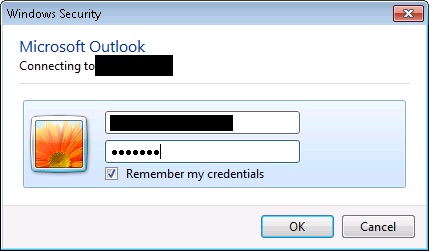
Issue:  when u configure the outlook email box, the credentials window keeps popping up again and again even after the correct credentials is entered

Windows Security

Resolution:
1) Clear vault in the credentials manager ( ***IMPORTANT*** make sure you take a backup and screenshot of the server details in credentials manager)
2) Repair install the office to this resolves the issue some times. Also try installing service pack
3) This resolution step worked for me. Create new profile in the email, and re-configure the mail box. If this doesn’t resolves the issue, then add the windows credentials manually for your email exchange server. You can get exchanger server info that needs to be added in credential manager either by capturing network packets using tools such as Wire-Shark or fiddler (OR you can also get server details from the backup screen shot from step 1 if you are configuring outlook for 2nd time)


Credentials Manager

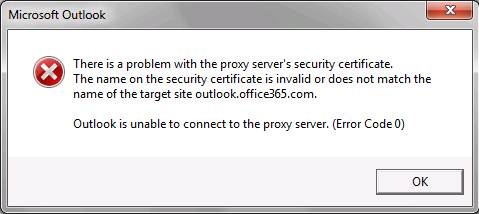
4)    You also uncheck the proxy, if it is checked. This causes the error message as

Certificate Error

Internet Options

There is not specific solutions for this issue which worked for me right away. I had to struggle for some 2 days to get it worked. Any of the above solutions can work for you. Please comment if you have any specific/above solution worked for you.

Good Day!

-Manju

Technology and tricks

How to save password in for office communicator (OCS 2007)

How to get save password option for Office Communicator users

Open Registry editor and locate the following key

HKLM/Software/Policies/Microsoft/Communicator,  and set SavePassword=1.

This enables a checkbox to save password in MOC login dialogue.

After the password is entered it is saved into the registry

HKCU/Software/Microsoft/Communicator/AccountPassword

This registry key store in hashed value. Changing the hash requires re-entering the password.

OC_ScreenShot

Note: You may want to use this option if MOC users login from workgroup machine, or Kerberos auth is not working. [If the following path in registry is not available, then create newly and add the key]