Technology and tricks

Kakuro Cheat Sheet: All Number Combinations (2–8 Cells)

A complete, ready-to-use list of all valid number combinations for Kakuro runs of 2 to 8 cells (digits 1–9, no repeats, strictly increasing within each combo).

πŸ”‘ Magic Numbers in Kakuro

Some sums have only one possible combination. These are called magic numbers and are the best starting points when solving a Kakuro puzzle:

  • 2 cells: 3 = (1,2), 16 = (7,9), 17 = (8,9)
  • 3 cells: 6 = (1,2,3), 24 = (7,8,9)
  • 4 cells: 10 = (1,2,3,4), 30 = (6,7,8,9)
  • 5 cells: 15 = (1,2,3,4,5), 35 = (5,6,7,8,9)
  • 6 cells: 21 = (1,2,3,4,5,6), 39 = (4,5,6,8,9,7)
  • 7 cells: 28 = (1,2,3,4,5,6,7), 41 = (2,3,4,5,6,7,14?)
  • 8 cells: 36 = (1,2,3,4,5,6,7,8), 44 = (2,3,4,5,6,7,8,9)
  • 9 cells: 45 = (1,2,3,4,5,6,7,8,9)

These are must-know shortcuts that make solving much easier.


πŸ“‹ Kakuro 2-Cell Combinations

Range: 3 – 17

Sum Pairs
3 (1,2)
4 (1,3)
5 (1,4), (2,3)
6 (1,5), (2,4)
7 (1,6), (2,5), (3,4)
8 (1,7), (2,6), (3,5)
9 (1,8), (2,7), (3,6), (4,5)
10 (1,9), (2,8), (3,7), (4,6)
11 (2,9), (3,8), (4,7), (5,6)
12 (3,9), (4,8), (5,7)
13 (4,9), (5,8), (6,7)
14 (5,9), (6,8)
15 (6,9), (7,8)
16 (7,9)
17 (8,9)

πŸ“‹ Kakuro 3-Cell Combinations

Range: 6 – 24

Sum Triplets
6 (1,2,3)
7 (1,2,4)
8 (1,2,5), (1,3,4)
9 (1,2,6), (1,3,5), (2,3,4)
10 (1,2,7), (1,3,6), (1,4,5), (2,3,5)
11 (1,2,8), (1,3,7), (1,4,6), (2,3,6), (2,4,5)
12 (1,2,9), (1,3,8), (1,4,7), (1,5,6), (2,3,7), (2,4,6), (3,4,5)
13 (1,3,9), (1,4,8), (1,5,7), (2,3,8), (2,4,7), (2,5,6), (3,4,6)
14 (1,4,9), (1,5,8), (1,6,7), (2,3,9), (2,4,8), (2,5,7), (3,4,7), (3,5,6)
15 (1,5,9), (1,6,8), (2,4,9), (2,5,8), (2,6,7), (3,4,8), (3,5,7), (4,5,6)
16 (1,6,9), (1,7,8), (2,5,9), (2,6,8), (3,4,9), (3,5,8), (3,6,7), (4,5,7)
17 (1,7,9), (2,6,9), (2,7,8), (3,5,9), (3,6,8), (4,5,8), (4,6,7)
18 (1,8,9), (2,7,9), (3,6,9), (3,7,8), (4,5,9), (4,6,8), (5,6,7)
19 (2,8,9), (3,7,9), (4,6,9), (4,7,8), (5,6,8)
20 (3,8,9), (4,7,9), (5,6,9), (5,7,8)
21 (4,8,9), (5,7,9), (6,7,8)
22 (5,8,9), (6,7,9)
23 (6,8,9)
24 (7,8,9)

πŸ“‹ Kakuro 4-Cell Combinations

Range: 10 – 30

Sum Quadruplets
10 (1,2,3,4)
11 (1,2,3,5)
12 (1,2,3,6), (1,2,4,5)
13 (1,2,3,7), (1,2,4,6), (1,3,4,5)
14 (1,2,3,8), (1,2,4,7), (1,2,5,6), (1,3,4,6), (2,3,4,5)
15 (1,2,3,9), (1,2,4,8), (1,2,5,7), (1,3,4,7), (1,3,5,6), (2,3,4,6)
16 (1,2,5,8), (1,2,6,7), (1,3,4,8), (1,3,5,7), (2,3,4,7), (2,3,5,6)
17 (1,2,6,8), (1,3,4,9), (1,3,5,8), (1,3,6,7), (1,4,5,7), (2,3,4,8), (2,3,5,7), (2,4,5,6)
18 (1,2,7,8), (1,3,5,9), (1,3,6,8), (1,4,5,8), (1,4,6,7), (2,3,6,7), (2,4,5,7), (3,4,5,6)
19 (1,2,7,9), (1,3,6,9), (1,3,7,8), (1,4,5,9), (1,4,6,8), (1,5,6,7), (2,3,5,9), (2,3,6,8), (2,4,5,8), (2,4,6,7), (3,4,5,7)
20 (1,2,8,9), (1,3,7,9), (1,4,6,9), (1,4,7,8), (1,5,6,8), (2,3,6,9), (2,3,7,8), (2,4,5,9), (2,4,6,8), (2,5,6,7), (3,4,5,8), (3,4,6,7)
21 (1,3,8,9), (1,4,7,9), (1,5,6,9), (1,5,7,8), (2,3,7,9), (2,4,6,9), (2,4,7,8), (2,5,6,8), (3,4,5,9), (3,4,6,8), (3,5,6,7)
22 (1,4,8,9), (1,5,7,9), (1,6,7,8), (2,3,8,9), (2,4,7,9), (2,5,6,9), (2,5,7,8), (3,4,7,8), (3,5,6,8), (4,5,6,7)
23 (1,5,8,9), (1,6,7,9), (2,4,8,9), (2,5,7,9), (2,6,7,8), (3,4,8,9), (3,5,7,9), (3,6,7,8), (4,5,6,8)
24 (1,6,8,9), (2,5,8,9), (2,6,7,9), (3,4,8,9), (3,6,7,9), (4,5,7,8)
25 (1,7,8,9), (2,6,8,9), (3,5,8,9), (3,6,7,9), (4,5,7,9), (4,6,7,8)
26 (2,7,8,9), (3,6,8,9), (4,5,8,9), (4,6,7,9), (5,6,7,8)
27 (3,7,8,9), (4,6,8,9), (5,6,7,9)
28 (4,7,8,9), (5,6,8,9)
29 (5,7,8,9)
30 (6,7,8,9)

πŸ“‹ Kakuro 5-Cell Combinations

Range: 15 – 35

Sum Quintuplets
15 (1,2,3,4,5)
16 (1,2,3,4,6)
17 (1,2,3,4,7), (1,2,3,5,6)
18 (1,2,3,4,8), (1,2,3,5,7), (1,2,4,5,6)
19 (1,2,3,4,9), (1,2,3,5,8), (1,2,3,6,7), (1,2,4,5,7), (1,3,4,5,6)
20 (1,2,3,6,8), (1,2,4,5,8), (1,2,4,6,7), (1,3,4,5,7), (2,3,4,5,6)
21 (1,2,3,7,8), (1,2,4,6,8), (1,2,5,6,7), (1,3,4,5,8), (1,3,4,6,7), (2,3,4,5,7)
22 (1,2,3,7,9), (1,2,4,6,9), (1,2,4,7,8), (1,3,4,5,9), (1,3,4,6,8), (1,3,5,6,7), (2,3,4,5,8), (2,3,4,6,7)
23 (1,2,3,8,9), (1,2,4,7,9), (1,2,5,6,9), (1,2,5,7,8), (1,3,4,6,9), (1,3,4,7,8), (1,3,5,6,8), (2,3,4,5,9), (2,3,4,6,8), (2,3,5,6,7)
24 (1,2,4,8,9), (1,2,5,7,9), (1,2,6,7,8), (1,3,4,7,9), (1,3,5,6,9), (1,3,5,7,8), (1,4,5,6,8), (2,3,4,6,9), (2,3,4,7,8), (2,3,5,6,8), (2,4,5,6,7)
25 (1,2,5,8,9), (1,2,6,7,9), (1,3,4,8,9), (1,3,5,7,9), (1,3,6,7,8), (1,4,5,7,9), (1,4,6,7,8), (2,3,4,7,9), (2,3,5,6,9), (2,3,5,7,8), (2,4,5,6,8)
26 (1,2,6,8,9), (1,3,4,8,9), (1,3,5,7,9), (1,3,6,7,8), (1,4,5,7,9), (1,4,6,7,8), (2,3,4,8,9), (2,3,5,7,9), (2,3,6,7,8), (2,4,5,6,9), (2,4,5,7,8)
27 (1,2,7,8,9), (1,3,5,8,9), (1,3,6,7,9), (1,4,5,8,9), (1,4,6,7,9), (1,5,6,7,8), (2,3,4,8,9), (2,3,5,7,9), (2,3,6,7,8), (2,4,5,6,9)
28 (1,3,6,8,9), (1,3,7,8,9), (1,4,5,8,9), (1,4,6,7,9), (1,5,6,7,8), (2,3,5,8,9), (2,3,6,7,9), (2,4,5,7,9), (2,4,6,7,8), (3,4,5,6,10?)
29 (1,4,6,8,9), (1,4,7,8,9), (1,5,6,7,9), (2,3,6,8,9), (2,3,7,8,9), (2,4,5,8,9), (2,4,6,7,9), (2,5,6,7,8), (3,4,5,7,10?)
30 (1,5,6,8,9), (1,5,7,8,9), (2,3,7,9,9?), (2,4,6,8,9), (2,4,7,8,9), (2,5,6,7,9), (3,4,5,8,9), (3,4,6,7,9), (3,5,6,7,8)
31 (1,6,7,8,9), (2,4,7,8,10?), (2,5,6,8,10?), (2,5,7,8,9), (3,4,6,8,10?), (3,4,7,8,9), (3,5,6,7,9)
32 (2,6,7,8,9), (3,4,7,8,10?), (3,5,6,8,10?), (3,5,7,8,9), (4,5,6,7,9)
33 (3,6,7,8,9), (4,5,7,8,9)
34 (4,6,7,8,9)
35 (5,6,7,8,9)

πŸ“‹ Kakuro 6-Cell Combinations

Range: 21 – 39

Sum Sextuplets
21 (1,2,3,4,5,6)
22 (1,2,3,4,5,7)
23 (1,2,3,4,5,8), (1,2,3,4,6,7)
24 (1,2,3,4,5,9), (1,2,3,4,6,8), (1,2,3,5,6,7)
25 (1,2,3,4,6,9), (1,2,3,4,7,8), (1,2,3,5,6,8), (1,2,4,5,6,7)
26 (1,2,3,4,7,9), (1,2,3,5,6,9), (1,2,3,5,7,8), (1,2,4,5,6,8), (1,3,4,5,6,7)
27 (1,2,3,4,8,9), (1,2,3,5,7,9), (1,2,3,6,7,8), (1,2,4,5,6,9), (1,2,4,5,7,8), (1,3,4,5,6,8), (2,3,4,5,6,7)
28 (1,2,3,5,8,9), (1,2,3,6,7,9), (1,2,4,5,7,9), (1,2,4,6,7,8), (1,3,4,5,6,9), (1,3,4,5,7,8), (2,3,4,5,6,8)
29 (1,2,3,6,8,9), (1,2,4,5,8,9), (1,2,4,6,7,9), (1,2,5,6,7,8), (1,3,4,5,7,9), (1,3,4,6,7,8), (2,3,4,5,6,9), (2,3,4,5,7,8)
30 (1,2,3,7,8,9), (1,2,4,6,8,9), (1,2,5,6,7,9), (1,3,4,5,8,9), (1,3,4,6,7,9), (1,3,5,6,7,8), (2,3,4,5,7,9), (2,3,4,6,7,8)
31 (1,2,4,7,8,9), (1,2,5,6,8,9), (1,3,4,6,8,9), (1,3,5,6,7,9), (1,4,5,6,7,8), (2,3,4,5,8,9), (2,3,4,6,7,9), (2,3,5,6,7,8)
32 (1,2,5,7,8,9), (1,3,4,7,8,9), (1,3,5,6,8,9), (1,4,5,6,7,9), (2,3,4,6,8,9), (2,3,5,6,7,9), (2,4,5,6,7,8)
33 (1,2,6,7,8,9), (1,3,5,7,8,9), (1,4,5,6,8,9), (2,3,4,7,8,9), (2,3,5,6,8,9), (2,4,5,6,7,9), (3,4,5,6,7,8)
34 (1,3,6,7,8,9), (1,4,5,7,8,9), (2,3,5,7,8,9), (2,4,5,6,8,9), (3,4,5,6,7,9)
35 (1,4,6,7,8,9), (2,3,6,7,8,9), (2,4,5,7,8,9), (3,4,5,6,8,9)
36 (1,5,6,7,8,9), (2,4,6,7,8,9), (3,4,5,7,8,9)
37 (2,5,6,7,8,9), (3,4,6,7,8,9)
38 (3,5,6,7,8,9)
39 (4,5,6,7,8,9)

πŸ“‹ Kakuro 7-Cell Combinations

Range: 28 – 41

Sum Septuplets
28 (1,2,3,4,5,6,7)
29 (1,2,3,4,5,6,8)
30 (1,2,3,4,5,6,9), (1,2,3,4,5,7,8)
31 (1,2,3,4,5,7,9), (1,2,3,4,6,7,8)
32 (1,2,3,4,5,8,9), (1,2,3,4,6,7,9), (1,2,3,5,6,7,8)
33 (1,2,3,4,6,8,9), (1,2,3,5,6,7,9), (1,2,4,5,6,7,8)
34 (1,2,3,4,7,8,9), (1,2,3,5,6,8,9), (1,2,4,5,6,7,9), (1,3,4,5,6,7,8)
35 (1,2,3,5,7,8,9), (1,2,4,5,6,8,9), (1,3,4,5,6,7,9), (2,3,4,5,6,7,8)
36 (1,2,3,6,7,8,9), (1,2,4,5,7,8,9), (1,3,4,5,6,8,9), (2,3,4,5,6,7,9)
37 (1,2,4,6,7,8,9), (1,3,4,5,7,8,9), (2,3,4,5,6,8,9)
38 (1,2,5,6,7,8,9), (1,3,4,6,7,8,9), (2,3,4,5,7,8,9)
39 (1,3,5,6,7,8,9), (2,3,4,6,7,8,9)
40 (1,4,5,6,7,8,9), (2,3,5,6,7,8,9)
41 (2,4,5,6,7,8,9)
42 (3,4,5,6,7,8,9)

πŸ“‹ Kakuro 8-Cell Combinations

Range: 36 – 44

Sum Octuplets
36 (1,2,3,4,5,6,7,8)
37 (1,2,3,4,5,6,7,9)
38 (1,2,3,4,5,6,8,9)
39 (1,2,3,4,5,7,8,9)
40 (1,2,3,4,6,7,8,9)
41 (1,2,3,5,6,7,8,9)
42 (1,2,4,5,6,7,8,9)
43 (1,3,4,5,6,7,8,9)
44 (2,3,4,5,6,7,8,9)

πŸ“‹ Kakuro 9-Cell Combinations

Range: 45

Sum Nonuplet
45 (1,2,3,4,5,6,7,8,9)

βœ… Final Tip

When solving Kakuro, always start with magic numbers and then eliminate impossibilities using cross constraints from intersecting runs. Bookmark this page for quick reference!
Azure Integration Services, Nutshell Series, Technology and tricks

Symmetric vs Asymmetric Encryption

Symmetric Encryption

  • Key: Shared between sender and receiver.
  • Encryption: Sender encrypts using key, creating ciphertext.
  • Example: AES encryption.
  • Advantages: Faster, suitable for large data.
  • Disadvantages: Key distribution challenge, security compromised if key is leaked.

Asymmetric Encryption

  • Keys: Public for encryption, private for decryption.
  • Encryption: Sender uses recipient’s public key.
  • Decryption: Recipient uses private key.
  • Digital Signature: Sender signs with private key.
  • Verification: Recipient verifies with sender’s public key.
  • Advantages: No shared key needed; public keys distributable via CA (certificate Authority).
  • Disadvantages: Slower, computationally intensive.
Azure, Azure Integration Services, Nutshell Series, Technology and tricks

Essential Network Commands – Nutshell

Managing network connections and diagnosing issues can be made easier by using the right network commands. Here’s a quick guide to essential network commands for Windows, Azure Function Apps Console, and OpenSSL.

1. Windows Network Commands

Command Environment Description Example
ipconfig Windows (CMD) Displays network configuration ipconfig
Get-NetIPAddress Windows (PowerShell) PowerShell version of ipconfig Get-NetIPAddress
ping Windows (CMD) Tests connectivity to a host ping google.com
Test-Connection Windows (PowerShell) PowerShell version of ping Test-Connection google.com
tracert Windows (CMD) Traces network packet route tracert google.com
Test-NetConnection Windows (PowerShell) PowerShell version of tracert Test-NetConnection google.com -TraceRoute
netstat Windows (CMD) Shows active connections netstat -an
Get-NetTCPConnection Windows (PowerShell) PowerShell version of netstat Get-NetTCPConnection

2. Azure Function Apps Console Network Commands

Command Environment Description Example
curl Azure Function Apps Tests network/API endpoint curl https://example.com
nslookup Azure Function Apps Resolves DNS name nslookup example.com
ping Azure Function Apps Tests connectivity to a remote host ping example.com
traceroute Azure Function Apps Traces packet path to a host traceroute example.com

3. OpenSSL Command

Command Environment Description Example
openssl s_client -connect OpenSSL (CMD, Console) Tests SSL/TLS connection to a host

Pass additional parameter -tls1 or -tls1_1 or -tls1_2 or -tls1_3 or -ssl3 to check appropriate TLS/SSL protocols

openssl s_client -connect example.com:443

These commands can simplify network troubleshooting across various environments: Windows, Azure Function Apps, and OpenSSL. With the right tools, managing your network connections becomes more efficient and secure.

Nutshell Series, Technology and tricks

Pagination Types In REST APIs – Nutshell

Pagination is a technique used to split large datasets into smaller, manageable chunks. In REST APIs, there are several types of pagination methods. Here’s a brief overview of each:

Pagination TypeDescriptionExampleProsCons
Offset-Based PaginationClient specifies an offset and a limit to fetch a specific range of results.GET /items?offset=20&limit=10Simple to implement.Can be inefficient for large datasets as it requires skipping through a potentially large number of records.
Cursor-Based PaginationAPI uses a cursor (often a token) to fetch results based on a specific position in the dataset.GET /items?cursor=abc123More efficient for large datasets and avoids issues with data consistency.More complex to implement and requires maintaining state.
Page-Based PaginationClient specifies a page number and page size to get results for that specific page.GET /items?page=2&size=10Easy to understand and use.Can be inefficient for large datasets if pages are skipped.
Keyset-Based PaginationUses unique keys or identifiers to paginate through results. The client provides a key from the last item of the previous page.GET /items?start_after=abc123Efficient and avoids issues with data consistency.Requires a unique and sequential key and can be complex to implement.
Time-Based PaginationPagination based on time or timestamps. The client requests items before or after a specific timestamp.GET /items?before=2024-09-01T00:00:00Z&limit=10Useful for datasets where items are time-stamped, such as logs or event data.Requires careful handling of time zones and daylight saving time.
Hybrid PaginationCombines multiple pagination strategies, such as offset-based with cursor-based, to leverage the strengths of each.GET /items?offset=20&limit=10&cursor=abc123Flexibility to handle diverse use cases and improve performance.Complex to implement and maintain.
DevOps, Technology and tricks

Deployment Techniques

Choosing the right deployment strategy is critical for ensuring smooth application updates and minimizing downtime. Below are some key deployment techniques, summarized with their key characteristics:

1. Blue-Green Deployment

  • Key Idea: Deploy new changes to a separate “Green” environment while the “Blue” environment serves production traffic.
  • Switch Over: Traffic is redirected to the new “Green” environment once validated.
  • Advantages: Minimal downtime, easy rollback to the “Blue” version if issues arise.
  • Challenges: Requires maintaining two identical environments.

2. Greenfield Deployment

  • Key Idea: Develop and deploy on a completely new infrastructure without affecting the existing system.
  • Use Case: Ideal for new projects or overhauling legacy systems.
  • Advantages: No interference with the current system, no legacy constraints.
  • Challenges: Requires a full build-up of infrastructure, more expensive in terms of resources.

3. Rolling Deployment

  • Key Idea: Deploy new versions incrementally, server by server, while others continue serving the older version.
  • Advantages: No downtime, reduced risk of total failure.
  • Challenges: Longer deployment time, potential for version mismatch issues during the rollout.

4. Canary Deployment

  • Key Idea: Release the new version to a small subset of users first, then gradually roll it out to the rest.
  • Advantages: Allows for testing with minimal user exposure, early detection of issues.
  • Challenges: Requires infrastructure for monitoring and user segmentation.

5. Recreate Deployment

  • Key Idea: Stops the existing application, deploys the new version, and restarts.
  • Advantages: Simple and direct.
  • Challenges: Causes downtime during deployment, not ideal for high-availability environments.

6. A/B Testing Deployment

  • Key Idea: Run two different versions of the application simultaneously, testing which one performs better for user interactions.
  • Advantages: Direct performance comparison, better user feedback.
  • Challenges: Requires more resources and user segmentation.

Conclusion

Each deployment strategy has its strengths and weaknesses depending on the specific requirements of the application and infrastructure. Consider factors like downtime, rollback capability, and resource availability when choosing the best deployment technique for your project.

Azure, Azure Integration Services, Nutshell Series, Technology and tricks

Basic Azure CLI Commands – Nutshell

Authentication & Subscription


# Login to Azure:
az login

# Show current subscription:
az account show

# List all subscriptions:
az account list

# Set active subscription:
az account set --subscription <subscription-id>

Resource Groups


# Create a resource group:
az group create --name <resource-group-name> --location <location>

# List all resource groups:
az group list

# Delete a resource group:
az group delete --name <resource-group-name> --yes

Virtual Machines (VMs)


# List all VMs:
az vm list --output table

# Create a VM:
az vm create --resource-group <resource-group-name> --name <vm-name> --image <image> --admin-username <username> --admin-password <password>

# Start a VM:
az vm start --name <vm-name> --resource-group <resource-group-name>

# Stop a VM:
az vm stop --name <vm-name> --resource-group <resource-group-name>

# Delete a VM:
az vm delete --resource-group <resource-group-name> --name <vm-name>

Storage Accounts


# Create a storage account:
az storage account create --name <storage-account-name> --resource-group <resource-group-name> --location <location> --sku Standard_LRS

# List storage accounts:
az storage account list --output table

# Delete a storage account:
az storage account delete --name <storage-account-name> --resource-group <resource-group-name>

Blob Storage


# Create a container in a storage account:
az storage container create --name <container-name> --account-name <storage-account-name>

# Upload a file to a container:
az storage blob upload --container-name <container-name> --file <file-path> --name <blob-name> --account-name <storage-account-name>

# List blobs in a container:
az storage blob list --container-name <container-name> --account-name <storage-account-name> --output table

# Download a blob:
az storage blob download --container-name <container-name> --name <blob-name> --file <destination-path> --account-name <storage-account-name>

App Services


# Create an App Service plan:
az appservice plan create --name <plan-name> --resource-group <resource-group-name> --sku B1 --is-linux

# Create a web app:
az webapp create --resource-group <resource-group-name> --plan <plan-name> --name <webapp-name> --runtime "NODE|14-lts"

# List web apps:
az webapp list --output table

# Delete a web app:
az webapp delete --resource-group <resource-group-name> --name <webapp-name>

Azure Function Apps


# Create a function app:
az functionapp create --resource-group <resource-group-name> --consumption-plan-location <location> --name <functionapp-name> --storage-account <storage-account-name> --runtime <runtime>

# List function apps:
az functionapp list --output table

# Delete a function app:
az functionapp delete --resource-group <resource-group-name> --name <functionapp-name>

Service Bus


# Create a Service Bus namespace:
az servicebus namespace create --resource-group <resource-group-name> --name <namespace-name> --location <location>

# Create a Service Bus queue:
az servicebus queue create --resource-group <resource-group-name> --namespace-name <namespace-name> --name <queue-name>

# List Service Bus namespaces:
az servicebus namespace list --output table

# Delete a Service Bus namespace:
az servicebus namespace delete --resource-group <resource-group-name> --name <namespace-name>

Key Vault


# Create a Key Vault:
az keyvault create --name <keyvault-name> --resource-group <resource-group-name> --location <location>

# List Key Vaults:
az keyvault list --output table

# Delete a Key Vault:
az keyvault delete --name <keyvault-name> --resource-group <resource-group-name>

Azure Monitor


# List metrics for a resource:
az monitor metrics list --resource <resource-id>

# List activity logs:
az monitor activity-log list --output table

Logic Apps


# Create a Logic App:
az logic workflow create --resource-group <resource-group-name> --name <logic-app-name> --location <location>

# List Logic Apps:
az logic workflow list --resource-group <resource-group-name> --output table

# Delete a Logic App:
az logic workflow delete --resource-group <resource-group-name> --name <logic-app-name>

Event Grid


# Create an Event Grid topic:
az eventgrid topic create --name <topic-name> --resource-group <resource-group-name> --location <location>

# List Event Grid topics:
az eventgrid topic list --resource-group <resource-group-name> --output table

# Delete an Event Grid topic:
az eventgrid topic delete --name <topic-name> --resource-group <resource-group-name>

Event Hubs


# Create an Event Hubs namespace:
az eventhubs namespace create --name <namespace-name> --resource-group <resource-group-name> --location <location>

# Create an Event Hub:
az eventhubs eventhub create --resource-group <resource-group-name> --namespace-name <namespace-name> --name <eventhub-name>

# List Event Hubs in a namespace:
az eventhubs eventhub list --resource-group <resource-group-name> --namespace-name <namespace-name> --output table

# Delete an Event Hub:
az eventhubs eventhub delete --resource-group <resource-group-name> --namespace-name <namespace-name> --name <eventhub-name>
.Net, Azure, C#, Cloud Design Patterns, Nutshell Series, Technology and tricks

SOLID Principles (with c# examples) – Nutshell

SOLID Principles in .NET – Explained with Examples

SOLID Principles in .NET – Explained with Examples

The SOLID principles are five guidelines that help developers write clean, maintainable, and extensible object-oriented code.
Below we go through each principle with concise C# examples showing what is bad and what is good.


1. Single Responsibility Principle (SRP)

Rule: A class should have only one reason to change.

Bad Example

public class User
{
    public string Name { get; set; }
    public string Email { get; set; }

    public void SendEmail(string message)
    {
        // Logic to send email
    }
}

Here, User manages both data and email-sending logic. It has more than one responsibility.

Good Example

public class User
{
    public string Name { get; set; }
    public string Email { get; set; }
}

public class EmailService
{
    public void SendEmail(string email, string message)
    {
        // Logic to send email
    }
}

User now manages only user data, while EmailService handles emails. Each has one responsibility.


2. Open/Closed Principle (OCP)

Rule: Classes should be open for extension but closed for modification.

Bad Example

public class AreaCalculator
{
    public double CalculateArea(object shape)
    {
        if (shape is Circle c)
            return Math.PI * c.Radius * c.Radius;
        if (shape is Square s)
            return s.Side * s.Side;
        return 0;
    }
}

Adding a new shape forces us to modify AreaCalculator, violating OCP.

Good Example

public abstract class Shape
{
    public abstract double Area();
}

public class Circle : Shape
{
    public double Radius { get; set; }
    public override double Area() => Math.PI * Radius * Radius;
}

public class Square : Shape
{
    public double Side { get; set; }
    public override double Area() => Side * Side;
}

Each shape implements its own Area. Adding new shapes doesn’t require changing existing code.


3. Liskov Substitution Principle (LSP)

Rule: Derived classes should be substitutable for their base types without breaking behavior.

Bad Example

public class Bird
{
    public virtual void Fly() { }
}

public class Ostrich : Bird
{
    public override void Fly()
    {
        throw new NotImplementedException();
    }
}

Substituting Ostrich for Bird breaks behavior, since ostriches cannot fly.

Good Example

public abstract class Shape
{
    public abstract double Area();
}

public class Rectangle : Shape
{
    public double Width { get; set; }
    public double Height { get; set; }
    public override double Area() => Width * Height;
}

Rectangle correctly substitutes Shape and can be used anywhere Shape is expected.


4. Interface Segregation Principle (ISP)

Rule: Don’t force classes to implement methods they don’t use.

Bad Example

public interface IMachine
{
    void Print();
    void Scan();
}

public class SimplePrinter : IMachine
{
    public void Print() { }
    public void Scan() { throw new NotImplementedException(); }
}

SimplePrinter doesn’t support scanning, yet it is forced to implement it.

Good Example

public interface IPrinter
{
    void Print();
}

public interface IScanner
{
    void Scan();
}

public class MultiFunctionPrinter : IPrinter, IScanner
{
    public void Print()
    {
        Console.WriteLine("Printing document...");
    }

    public void Scan()
    {
        Console.WriteLine("Scanning document...");
    }
}

Now classes only implement what they need. A simple printer just implements IPrinter.


5. Dependency Inversion Principle (DIP)

Rule: High-level modules should not depend on low-level modules. Both should depend on abstractions.

Bad Example

public class DataManager
{
    private readonly SQLDatabase _db = new SQLDatabase();

    public void Save(string data)
    {
        _db.SaveData(data);
    }
}

public class SQLDatabase
{
    public void SaveData(string data) { }
}

DataManager is tightly coupled to SQLDatabase, making it hard to switch databases.

Good Example

public interface IDatabase
{
    void SaveData(string data);
}

public class SQLDatabase : IDatabase
{
    public void SaveData(string data)
    {
        // Save data to SQL database
    }
}

public class DataManager
{
    private readonly IDatabase _database;
    public DataManager(IDatabase database)
    {
        _database = database;
    }

    public void Save(string data)
    {
        _database.SaveData(data);
    }
}

DataManager now depends on IDatabase. Any database implementation can be injected.


Key Takeaways

  • SRP β€” One class, one responsibility.
  • OCP β€” Extend, don’t modify working code.
  • LSP β€” Subtypes must preserve base-class behavior.
  • ISP β€” Keep interfaces small and focused.
  • DIP β€” Depend on abstractions, not concretions.
.Net, Nutshell Series, Technology and tricks

ASP.NET Core Web API – Nutshell

1. Introduction to ASP.NET Core Web API
APIs (Application Programming Interfaces) enable communication between different software systems. ASP.NET Core, a cross-platform framework, is widely used to build scalable, high-performance web apps and services, making it ideal for modern API development.

2. Project Structure in ASP.NET Core
The core project structure revolves around the Program.cs and Startup.cs files. These files handle the application’s configuration, services, and middleware setup, which manages the request pipeline, determining how HTTP requests and responses are processed.

3. Core Concepts

The Startup class configures essential services and middleware for the application.

Dependency Injection (DI) is a fundamental principle in ASP.NET Core, allowing services to be injected into classes to keep the code modular and maintainable.

4. Middleware
ASP.NET Core uses middleware components that process HTTP requests in a sequential order, enabling flexible customization of the request and response handling.

5. Creating an API with ASP.NET Core
Controllers in ASP.NET Core manage API logic and routing of requests. By default, JSON is the format for responses, ensuring easy communication between the API and clients.

6. Testing APIs
Tools like Postman and Fiddler are essential for testing and debugging APIs, helping developers simulate requests and inspect responses for errors.

7. Dependency Injection and Repositories
Using Dependency Injection ensures a modular design, while repositories separate data access logic from business logic, leading to cleaner and more maintainable code.

8. Action Methods and Results
Action methods map to HTTP methods (GET, POST, PUT, DELETE), and return standardized results to ensure consistent responses for API consumers.

9. Adding Entity Framework Core
Entity Framework Core (EF Core) simplifies database interactions by allowing developers to use LINQ for querying, abstracting away complex SQL queries.

10. Logging
Logging is essential for tracking events and diagnosing errors within the application, providing insights for monitoring and troubleshooting.

11. Content Formatting
Content negotiation allows the API to respond in various formats (e.g., JSON, XML), based on client preferences, enhancing flexibility.

12. Versioning APIs
API versioning allows updates without breaking existing clients. Different versioning strategies include:

URL Versioning: Version included in the URL (e.g., /api/v1/products).

Query String Versioning: Version passed as a query parameter (e.g., /api/products?version=1).

Header Versioning: Clients specify the version in request headers (e.g., api-version: 1.0).

Media Type Versioning: Versioning via the Accept header (e.g., application/vnd.myapi.v1+json).

13. Deploying the API
ASP.NET Core APIs can be deployed to multiple platforms, including Azure, IIS, Docker, and Linux, providing flexibility based on hosting needs.

14. Conclusion
ASP.NET Core enables the creation of robust and scalable APIs with modular architecture, flexible deployment, and simplified data handling via Entity Framework Core. Through features like middleware, versioning, and dependency injection, it supports building modern web services that are maintainable and future-proof.

Azure, Azure Integration Services, Design Patterns, Technology and tricks

Restful API design principles – Nutshell

HTTP VerbQueryDescription
GET /usersRetrieves a list of users
GET /users/8Retrieves a specific user
POST/usersCreates a new user
PUT/users/8Updates user #8
PATCH/users/8Partially updates
PATCH/users/8/statusUpdates status against user #8
DELETE/users/8Deletes user #8

RESTful APIs are vital for modern web applications, providing a flexible and scalable way for systems to communicate. Here’s a quick guide to key principles, best practices, HTTP methods, status codes, and common errors.

Key RESTful Principles

1. Uniform Interface: Resources identified by URLs (e.g., β€œ/users/123”) using HTTP methods (β€œGET”, β€œPOST”, etc.).
2. Stateless: Each request includes all information required; no session state stored server-side.
3. Client-Server Separation: Clients handle UI, while servers manage data and logic independently.
4. Cacheable: Define caching rules (e.g., β€œCache-Control”) to improve performance.
5. Layered System: Clients interact with layers (e.g., proxies) without knowing internal server details.

Best Practices

1. Use Nouns in URLs: β€œ/users”, not β€œ/getUsers”.
2. Version Your API: β€œ/v1/users”, to maintain backward compatibility.
3. Use Proper Status Codes: Ensure clear communication of the outcome.
4. Paginate Large Responses: For example, β€œGET /users?page=1&limit=50”.
5. Secure Your API: Use authentication (OAuth, API keys) and HTTPS.

HTTP Methods and REST Mapping

– GET: Retrieve data (read).
  – Example: β€œGET /users/123” – Get user with ID 123.
– POST: Create a new resource.
  – Example: β€œPOST /users” – Create a new user.
– PUT: Update or replace an existing resource.
  – Example: β€œPUT /users/123” – Update user with ID 123.
– PATCH: Partially update a resource.
  – Example: β€œPATCH /users/123” – Update a user’s email.
– DELETE: Remove a resource.
  – Example: β€œDELETE /users/123” – Delete user with ID 123.

HTTP Status Codes

– Success:
  – β€œ200 OK”: Request succeeded (GET, PUT).
  – β€œ201 Created”: New resource created (POST).
  – β€œ204 No Content”: Request successful, no content to return (DELETE).

– Client-Side Errors:
  – β€œ400 Bad Request”: Malformed request.
  – β€œ401 Unauthorized”: Authentication required.
  – β€œ403 Forbidden”: Access denied.
  – β€œ404 Not Found”: Resource not found.

– Server-Side Errors:
  – β€œ500 Internal Server Error”: Generic server failure.
  – β€œ502 Bad Gateway”: Invalid response from an upstream server.
  – β€œ503 Service Unavailable”: Server temporarily unable to handle the request.

By following these principles and best practices, you can design scalable, secure, and maintainable RESTful APIs that provide a seamless experience for users and developers alike.

Technology and tricks

Slowness of Deployments via ARM template for APIM

One of common way of deploying Azure resources is via ARM templates. ARM templates are help us to achieve an infrastructure-as-code solution for Azure deployments and give control of operations team. The ARM template processing of resources is in a declarative manner. This means that the desired state of the resources is defined in the template, and the ARM service ensures that the resources are created and configured to match that state.

ARM templates are complex when it comes to troubleshooting and testing as it takes lot of time. If you have ever received below error and ARM templates are huge, then it will a nightmare. Of the way to look at increasing performance of ARM deployments by removing unnecessary elements in the templates.

One of such issues i was struggling was with below errors.

{
  "error": {
    "code": "ServerClosedRequest",
    "message": "An internal server error was encountered while processing request for 'Microsoft.ApiManagement'. Please try your request again later."
  }
}

{
  "error": {
    "code": "ManagementApiRequestFailed",
    "message": "Failed to connect to management endpoint xxxx.management.azure-api.net:3443 for Developer SKU service which will have inherent downtime during underneath platform upgrades. Please refer to SLA at https://aka.ms/apimsla and considering upgrading to a SKU Tier with higher SLA."
  }
}

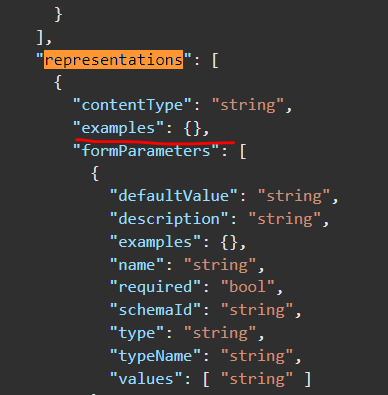
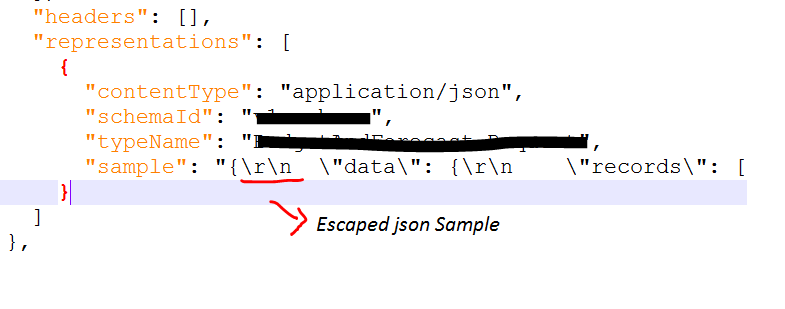
Root cause of this issue was with the node marked with “examples”. It contains unescaped/unwrapped json examples. I had to remove these examples and add to “sample” node as wrapped and escaped

I hope this was a similar or exact issue you faced and help you to resolve it. If you have further question or want to share similar issue, please comment