.Net, Azure, C#, Cloud Design Patterns, Nutshell Series, Technology and tricks

SOLID Principles (with c# examples) – Nutshell

SOLID Principles in .NET – Explained with Examples

SOLID Principles in .NET – Explained with Examples

The SOLID principles are five guidelines that help developers write clean, maintainable, and extensible object-oriented code.
Below we go through each principle with concise C# examples showing what is bad and what is good.


1. Single Responsibility Principle (SRP)

Rule: A class should have only one reason to change.

Bad Example

public class User
{
    public string Name { get; set; }
    public string Email { get; set; }

    public void SendEmail(string message)
    {
        // Logic to send email
    }
}

Here, User manages both data and email-sending logic. It has more than one responsibility.

Good Example

public class User
{
    public string Name { get; set; }
    public string Email { get; set; }
}

public class EmailService
{
    public void SendEmail(string email, string message)
    {
        // Logic to send email
    }
}

User now manages only user data, while EmailService handles emails. Each has one responsibility.


2. Open/Closed Principle (OCP)

Rule: Classes should be open for extension but closed for modification.

Bad Example

public class AreaCalculator
{
    public double CalculateArea(object shape)
    {
        if (shape is Circle c)
            return Math.PI * c.Radius * c.Radius;
        if (shape is Square s)
            return s.Side * s.Side;
        return 0;
    }
}

Adding a new shape forces us to modify AreaCalculator, violating OCP.

Good Example

public abstract class Shape
{
    public abstract double Area();
}

public class Circle : Shape
{
    public double Radius { get; set; }
    public override double Area() => Math.PI * Radius * Radius;
}

public class Square : Shape
{
    public double Side { get; set; }
    public override double Area() => Side * Side;
}

Each shape implements its own Area. Adding new shapes doesn’t require changing existing code.


3. Liskov Substitution Principle (LSP)

Rule: Derived classes should be substitutable for their base types without breaking behavior.

Bad Example

public class Bird
{
    public virtual void Fly() { }
}

public class Ostrich : Bird
{
    public override void Fly()
    {
        throw new NotImplementedException();
    }
}

Substituting Ostrich for Bird breaks behavior, since ostriches cannot fly.

Good Example

public abstract class Shape
{
    public abstract double Area();
}

public class Rectangle : Shape
{
    public double Width { get; set; }
    public double Height { get; set; }
    public override double Area() => Width * Height;
}

Rectangle correctly substitutes Shape and can be used anywhere Shape is expected.


4. Interface Segregation Principle (ISP)

Rule: Don’t force classes to implement methods they don’t use.

Bad Example

public interface IMachine
{
    void Print();
    void Scan();
}

public class SimplePrinter : IMachine
{
    public void Print() { }
    public void Scan() { throw new NotImplementedException(); }
}

SimplePrinter doesn’t support scanning, yet it is forced to implement it.

Good Example

public interface IPrinter
{
    void Print();
}

public interface IScanner
{
    void Scan();
}

public class MultiFunctionPrinter : IPrinter, IScanner
{
    public void Print()
    {
        Console.WriteLine("Printing document...");
    }

    public void Scan()
    {
        Console.WriteLine("Scanning document...");
    }
}

Now classes only implement what they need. A simple printer just implements IPrinter.


5. Dependency Inversion Principle (DIP)

Rule: High-level modules should not depend on low-level modules. Both should depend on abstractions.

Bad Example

public class DataManager
{
    private readonly SQLDatabase _db = new SQLDatabase();

    public void Save(string data)
    {
        _db.SaveData(data);
    }
}

public class SQLDatabase
{
    public void SaveData(string data) { }
}

DataManager is tightly coupled to SQLDatabase, making it hard to switch databases.

Good Example

public interface IDatabase
{
    void SaveData(string data);
}

public class SQLDatabase : IDatabase
{
    public void SaveData(string data)
    {
        // Save data to SQL database
    }
}

public class DataManager
{
    private readonly IDatabase _database;
    public DataManager(IDatabase database)
    {
        _database = database;
    }

    public void Save(string data)
    {
        _database.SaveData(data);
    }
}

DataManager now depends on IDatabase. Any database implementation can be injected.


Key Takeaways

  • SRP — One class, one responsibility.
  • OCP — Extend, don’t modify working code.
  • LSP — Subtypes must preserve base-class behavior.
  • ISP — Keep interfaces small and focused.
  • DIP — Depend on abstractions, not concretions.
.Net, Nutshell Series, Technology and tricks

ASP.NET Core Web API – Nutshell

1. Introduction to ASP.NET Core Web API
APIs (Application Programming Interfaces) enable communication between different software systems. ASP.NET Core, a cross-platform framework, is widely used to build scalable, high-performance web apps and services, making it ideal for modern API development.

2. Project Structure in ASP.NET Core
The core project structure revolves around the Program.cs and Startup.cs files. These files handle the application’s configuration, services, and middleware setup, which manages the request pipeline, determining how HTTP requests and responses are processed.

3. Core Concepts

The Startup class configures essential services and middleware for the application.

Dependency Injection (DI) is a fundamental principle in ASP.NET Core, allowing services to be injected into classes to keep the code modular and maintainable.

4. Middleware
ASP.NET Core uses middleware components that process HTTP requests in a sequential order, enabling flexible customization of the request and response handling.

5. Creating an API with ASP.NET Core
Controllers in ASP.NET Core manage API logic and routing of requests. By default, JSON is the format for responses, ensuring easy communication between the API and clients.

6. Testing APIs
Tools like Postman and Fiddler are essential for testing and debugging APIs, helping developers simulate requests and inspect responses for errors.

7. Dependency Injection and Repositories
Using Dependency Injection ensures a modular design, while repositories separate data access logic from business logic, leading to cleaner and more maintainable code.

8. Action Methods and Results
Action methods map to HTTP methods (GET, POST, PUT, DELETE), and return standardized results to ensure consistent responses for API consumers.

9. Adding Entity Framework Core
Entity Framework Core (EF Core) simplifies database interactions by allowing developers to use LINQ for querying, abstracting away complex SQL queries.

10. Logging
Logging is essential for tracking events and diagnosing errors within the application, providing insights for monitoring and troubleshooting.

11. Content Formatting
Content negotiation allows the API to respond in various formats (e.g., JSON, XML), based on client preferences, enhancing flexibility.

12. Versioning APIs
API versioning allows updates without breaking existing clients. Different versioning strategies include:

URL Versioning: Version included in the URL (e.g., /api/v1/products).

Query String Versioning: Version passed as a query parameter (e.g., /api/products?version=1).

Header Versioning: Clients specify the version in request headers (e.g., api-version: 1.0).

Media Type Versioning: Versioning via the Accept header (e.g., application/vnd.myapi.v1+json).

13. Deploying the API
ASP.NET Core APIs can be deployed to multiple platforms, including Azure, IIS, Docker, and Linux, providing flexibility based on hosting needs.

14. Conclusion
ASP.NET Core enables the creation of robust and scalable APIs with modular architecture, flexible deployment, and simplified data handling via Entity Framework Core. Through features like middleware, versioning, and dependency injection, it supports building modern web services that are maintainable and future-proof.

.Net, C#

Creating String extension function

public static string ToCamelCase(this string str)
{
if (!string.IsNullOrEmpty(str) && str.Length > 1)
{
return Char.ToUpperInvariant(str[0]) + str.Substring(1);
}
return str;
}

Usage:
string text = “test data”;
string camalCaseText = text.ToCamelCase();

Output: Test data

Function declaration should be done outside of main class.

https://docs.microsoft.com/en-us/dotnet/csharp/programming-guide/concepts/linq/how-to-add-custom-methods-for-linq-queries

.Net, C#, Technology and tricks

System.Runtime.InteropServices.COMException – Task scheduler – Console application

Description: The process was terminated due to an unhandled exception.
Exception Info: System.Runtime.InteropServices.COMException
Stack:
at Microsoft.Office.Interop.Excel.Workbooks.Open(System.String, System.Object, System.Object, System.Object, System.Object, System.Object, System.Object, System.Object, System.Object, System.Object, System.Object, System.Object, System.Object, System.Object, System.Object)
at NotificationReportGenerator.ExcelFactory.ReadExcel(System.String)
at NotificationReportGenerator.Program.Main(System.String[])

The solution for this appalling BUG in Microsoft IIS & Excel is terrific:

  1. Create directory “C:\Windows\SysWOW64\config\systemprofile\Desktop ” (for 64 bit Windows) or “C:\Windows\System32\config\systemprofile\Desktop ” (for 32 bit Windows)
  2. Set Full control permissions for directory Desktop (for example in Win7 & IIS 7 & DefaultAppPool set permissions for user
    “IIS AppPool\DefaultAppPool”)
.Net, C#, Visual Studio

Issue with Visual Studio sign using Azure account

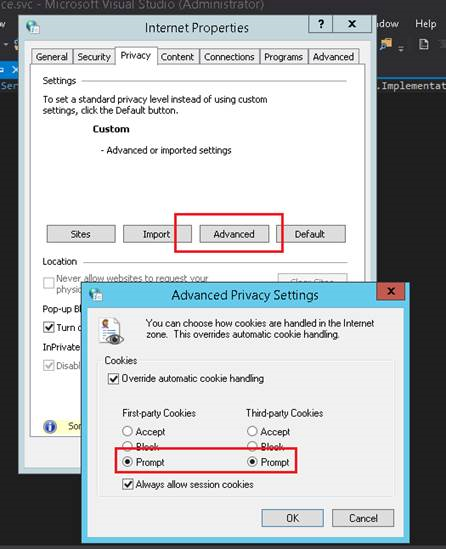
If you are ending with errors while logging in to Visual Studio (2015 or 2017) with your Microsoft subscription account with error message “Cookies are blocked, cannot login”. Then below is setting change you need to do in “Internet Options” to resolve it.

Visual studio always used internet engine for internet connectivity and I didn’t find any way to change it to use to Mozilla or any other internet engine.

Below  change in “Internet Options” setting prompts to accept cookies and this resolved the issue.

Untitled.png

After changing, try to login, you we will prompted to accept cookie couple of times. This will resolve the issue