I’m writing this blog as i couldn’t get straight forward steps neither from msdn nor from google. I had to refer basic of SQL database mail, RTA – real time aggregation, few of the blogs together.
My requirement was to set BAM alert on aggregated value which exeeds limit of 1000. I had built an activity, view and dimension for recording number of requests mades.
First Issue: Activity deployment error using BM.exe
Updating Activity… Done.
EXEC : Updating View… error : The BAM deployment failed.
SQL Analysis Services 2008 Enterprise Edition is not configured. Can not create OLAP cubes for RTAs.
Cause and resolution: This is main caused as RTA (real time aggregation) was enabled in excel sheet. There is small icon in the excel bam template which need to be unchecked. RTA is not support in SQL standard version and supported only in enterprise version.

Whats next: Now how to get near real time experiance on SQL standard version?
Solution: Create a job, under SQL agent, add steps to run two DTS packages from SSIS. Put schedule as run as every minute or once per 2 minute.
BAM_AN_*, BAM_DM_*


Additionally, if you are unable to see aggregation data then either your RTA is disabled and Aggregation jobs are not running. Aggregation packages doesnt run automatically for scheduled aggregation. we need to create a job in SQL agent.
Whats next: Issues runing the job as BAM user
Error: Connecting to the Integration Services service on the computer “XXXX” failed with the following error: “Access is denied.”
By default, only administrators have access to the Integration Services service. On Windows Vista and later, the process must be running with administrative privileges in order to connect to the Integration Services service. See the help topic for information on how to configure access to the service.
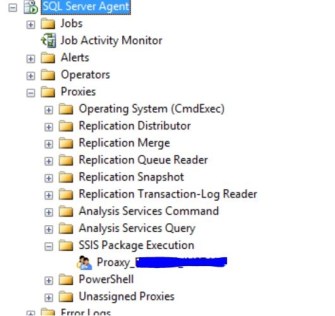
Solution: Dont waste time in granting permissions in component services for integration services (as many articles says), Instead create a proxy user in SQL server and and run the agent job under proxy user. Proxy user can be created under proxies of SQL server agent

Whats next: BAM alert jobs failure. Unhandled exception caught. Stoppping the service.
Error: System.Data.SqlClient.SqlException: The EXECUTE permission was denied on the object ‘bam_Metadata_GetProperty’, database ‘BAMPrimaryImport’, schema ‘dbo’.
at System.Data.SqlClient.SqlConnection.OnError(SqlException exception, Boolean breakConnection, Action`1 wrapCloseInAction)
at System.Data.SqlClient.TdsParser.ThrowExceptionAndWarning(TdsParserStateObject stateObj, Boolean callerHasConnectionLock, Boolean asyncClose)
Application: BAMAlerts.exe
Framework Version: v4.0.30319
Description: The process was terminated due to an unhandled exception.
Exception Info: System.Data.SqlClient.SqlException
at System.Data.SqlClient.SqlConnection.OnError(System.Data.SqlClient.SqlException, Boolean, System.Action`1<System.Action>)
at System.Data.SqlClient.TdsParser.ThrowExceptionAndWarning(System.Data.SqlClient.TdsParserStateObject, Boolean, Boolean)
at System.Data.SqlClient.TdsParser.TryRun(System.Data.SqlClient.RunBehavior, System.Data.SqlClient.SqlCommand, System.Data.SqlClient.SqlDataReader, System.Data.SqlClient.BulkCopySimpleResultSet, System.Data.SqlClient.TdsParserStateObject, Boolean ByRef)
Solution:
Go to “Stored Procedures”, right-click on the “bam_Metadata_GetProperty” procedure to grant permissions on, and then select “Properties” option.
From Stored Procedure Properties, select the “Permissions”
And to grant permissions to a user, database role, or application role you must click the “Search” button.
- In this case, we need to give execution privileges to the database role “BAM_ManagementNSReader
Whats next: Configure SQL BAM profile to use office 365 (as we didn’t wanted to use local SMTP server nor from IIS SMTP Email feature)
Solution: No need to reconfigure BizTalk configuration wizard. just update SQL database mail via “Configure database mail” and “view, change, or delete an existing account” from default bam profile. update only SMTP server and credentials

Whats next: Configure BAM alerts in BAM portal.
for simple value: Set alert will only get enable if you add one record in filter against which you want to create alert.

Aggregated value: Its really hard to find out from msdn how to create alert on aggregated values. we have click on the value to create alerts for respective row and aggregated column

Add subscribers either as email or as File
Whats next: Email alerts was throwing error
The mail could not be sent to the recipients because of the mail server failure. (Sending Mail using Account 22 (2019-10-11T15:50:51). Exception Message: Cannot send mails to mail server. (Transaction failed. The server response was: 5.2.0 STOREDRV.Submission.Exception:SendAsDeniedException.MapiExceptionSendAsDenied; Failed to process message due to a permanent exception with message Cannot submit message. 0.35250:0A000981, 1.36674:0A000000, 1.61250:00000000, 1.45378:02000000, 1.44866:051F0000, 1.36674:0E000000, 1.61250:00000000, 1.45378:0A1F0000, 1.44866:86020000, 16.55847:72100000, 17.43559:0000000004020000000000000000000000000000, 20.52176:140F2B890E00101043050000, 20.50032:140F2B897E17000000000000, 0.35180:48050000, 255.23226:0A000E81, 255.27962:0A000000, 255.27962:0E000000, 255.31418:0A000F81, 0.35250:0A000000, 1.36674:0A000000, 1.61250:00000000, 1.45378:02000000, 1.44866:32000000, 1.36674:32000000, 1.61250:00000000, 1.45378:37000000, 1.44866:01000000, 16.55847:9E000000, 17.43559:0000000000030000000000000000000000000000, 20.52176:140F2B890E0070200A001481, 20.50032:140F2B897E1710106B050000, 0.35180:0A001581, 255.23226:4800D13D, 255.27962:0A000000, 255.27962:32000000, 255.17082:DC040000, 0.27745:75050000, 4.21921:DC040000, 255.27962…).
Solution: This one was the hardest of all as error message couldnt tell where exactly was the issue. Apperently, it was an issue with Email From field, but couldn’t get where was the error. I spent lot of time on this and identified as an issue with BAMalerts.exe. This program has been written to read the Email “From” field from table from dbo.bam_Metadata_Properties database BAMPrimaryImport
SELECT PropertyValue FROM dbo.bam_Metadata_Properties WHERE propertyname = ‘AlertMailFrom’
Updating value in this table will get the Email From field corrected.
VOILA, BAM alerts are working with office 365 now! Hurray!


 Techy Chalkboard in bits and pieces
You must be logged in to post a comment.